
HTML Letter Spacing Guide with Practical Examples and Code
Letter-spacing (often called tracking in typography) in is used to adjust the horizontal density of a block of text. While most professional fonts are "pre-spaced" by the designer, standard design practices often call for adjustments based on the size and weight of the text.
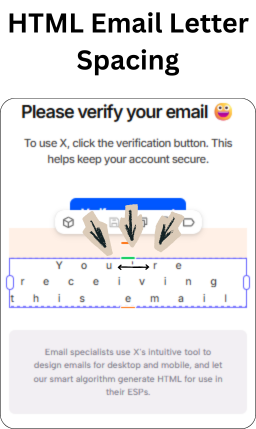
In HTML email, letter spacing requires both CSS and MSO (Microsoft Outlook) declarations:
letter-spacing: -1.2px; /* Standard CSS (all modern clients) */ mso-letter-spacing: -1.2px; /* Outlook / Word-rendering engine */Always pair them. Outlook ignores standard CSS letter-spacing without the mso- prefix.
While em is the standard for web accessibility, Outlook for Windows often struggles with relative units. Setting spacing in px ensures that the "Word" rendering engine used by Outlook handles the tracking as a fixed value rather than an unpredictable percentage.
Mastering the technical details of email design is easier when you start with a solid foundation. Tabular's html email template ibrary includes pre-optimized designs that handle spacing, fonts, and rendering across all email clients—so you can customize with confidence.
HTML Email Letter Spacing in Action
The general rule of thumb is an inverse relationship: as your font size gets larger, your letter-spacing should usually get tighter; as your font size gets smaller, your spacing should open up.
every part of an email
1. Headlines and Display Text
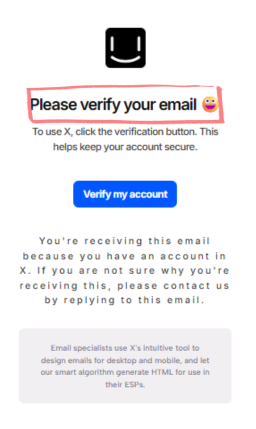
In email header design, negative tracking at large sizes makes headings feel sharp and modern. A reliable rule of thumb: subtract roughly 5% of the font size. At 24px, that gives you −1.2px. As font size increases, tighten proportionally.
<h1 style="
  font-size: 24px;
  font-weight: 600;
  letter-spacing: -1.2px;
">Please verify your email 😀</h1>
Negative tracking at large sizes makes headings feel sharp and intentional. A good rule: subtract ~5% of font-size (24px × 5% ≈ −1.2px).
2. Body & UI Text — Subtle Tightening
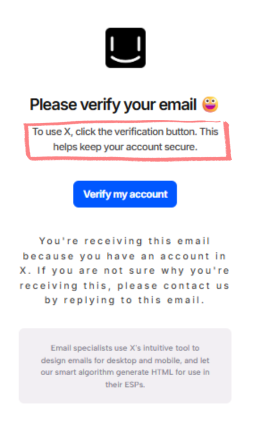
A small negative value at body sizes removes the default looseness of most web fonts, making text feel tighter and easier to scan — without feeling compressed.
<p style=" font-size: 15px; letter-spacing: -0.6px; ">To use X, click the verification button...</p> <a style=" font-size: 15px; letter-spacing: -0.5px; ">Verify my account</a>3. Fine Print / Legal — Wide Tracking
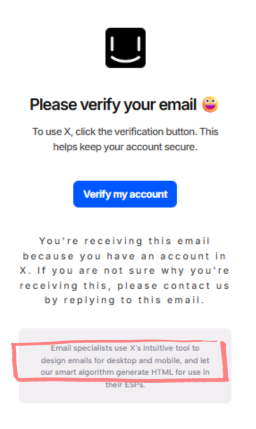
Positive (wide) tracking is used for de-emphasized text — it signals "secondary info" and creates visual hierarchy without changing font size.
<p style="font-size: 14px; letter-spacing: 3px;">
  You're receiving this email because you have an account in X...
</p>
The Full Letter Spacing Hierarchy in HTML Emails
| Role | Font Size | Letter Spacing | Effect |
|---|---|---|---|
| Heading | 24px | -1.2px | Sharp, modern, confident |
| Button label | 15px | -0.5px | Clean and legible |
| Body copy | 15px | -0.6px | Comfortable reading |
| Fine print / legal | 14px | 3px | De-emphasized, airy |
| Small caption | 12px | 0 | Neutral |
Implementation of Letter Spacing in HTML Email Templates
<p style="
  font-family: Inter, Arial, sans-serif;
  font-size: 16px;
  font-weight: 500;
  line-height: 24px;
  letter-spacing: -0.6px;
  color: #424040;
">
  Your message here.
</p>
Outlook's mso-letter-spacing uses twips (1/20th of a point), not pixels. The conversion isn't exact, but a close approximation:
| CSS(px) | MSO(twips) |
|---|---|
| -1.2px | -2 |
| -0.6px | -1 |
| -0.5px | -1 |
| 3px | 6 |
For most designs, keeping them roughly close is sufficient. Precision matters most on large headlines.
Letter-Spacing Support in Email Clients
| Email Client | Support Status | Notes |
|---|---|---|
| Email ClientSupport StatusNotesApple Mail (macOS & iOS) | ✅ Full | Supported across all versions. |
| Email ClientSupport StatusNotesApple Mail (macOS & iOS)✅ FullSupported across all versions.Gmail (Desktop & Mobile) | ✅ Full | Supported on Webmail, iOS, and Android. |
| Outlook (Windows) | ⚠️ Partial | Supported in 2003. Buggy/Partial in 2007–2019. |
| Outlook (macOS & iOS) | ✅ Full | Supported in modern versions. |
| Outlook.com | ✅ Full | Supported. |
| Yahoo! Mail | ✅ Full | Supported on Desktop and Mobile. |
| AOL | ✅ Full | Supported on Desktop and Mobile. |
| Samsung Email | ✅ Full | Supported. |
| Mozilla Thunderbird | ✅ Full | Supported. |
| ProtonMail | ✅ Full | Supported. |
| GMX / WEB.DE / 1&1 | ✅ Full | Supported. |
Key Rules for Letter Spacing in HTML Email Design
1. Set letter-spacing directly on text elements, not tables: Avoid putting it on <table> or <td> — it cascades unpredictably in Outlook. Always apply it directly to <p>, <h1>, <a>, or <span>.
2. Use px only — never em: em-based letter-spacing breaks in several major email clients. Pixels are the only reliably supported unit.
3. All-caps text always needs positive tracking: text-transform: uppercase compresses letters visually. Always pair it with at least 1.5px–3px of letter-spacing, or it will look cramped.
4. Test in Outlook: It's the one client most likely to misinterpret or ignore letter-spacing without the mso- fallback. Always test before sending.
Final Words
The email design used in this article is built with Tabular's email template builder. You can customize your choice of professionally designed, fully responsive HTML templates from Tabular using the easy-to-use drag-and-drop builder, then export it as HTML or PDF with a free account.
The email in this guide uses three values that together create a clear visual hierarchy:
- Tight tracking at the top (
-1.2px) — draws the eye, feels premium - Neutral tracking in the middle (
-0.5pxto-0.6px) — comfortable for reading - Wide tracking at the bottom (
3px) — pushes legal copy into the background
This is the core principle: letter spacing is a hierarchy tool, not just a stylistic preference. Used consistently, it guides the reader's eye from the most important content to the least — without changing layout, color, or font size.