Designing multilingual emails
Unlike many other tools, tabular.email lets you create your email template once in a source language and easily add translations — all without duplicating the design. This means you can maintain a consistent look and feel across all languages while only changing the text content. Whether you’re creating a simple newsletter or a complex marketing campaign, you can work more efficiently by managing everything in a single, unified template. The multilingual feature is perfect for teams working in global markets, allowing designers, marketers, and translators to collaborate easily in one place.
Adding a new language
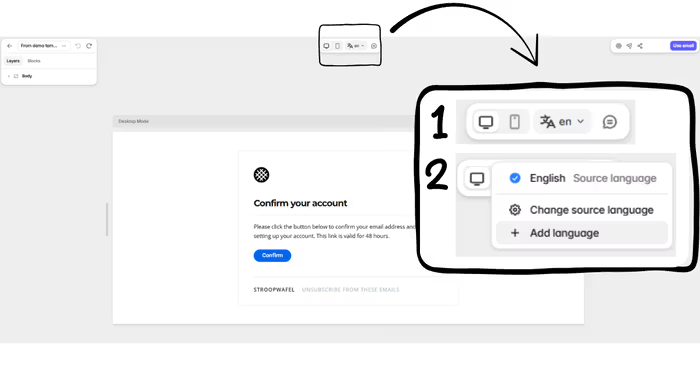
Step 1: Locate the language switcher
At the top of the editor, you’ll find the Language Switcher, along with commenting tools and responsive design previews.
Step 2: Add the language
Click Add language, then select your target language.The system will copy all text from your source language into this new version and switch to that version.
Step 3: Translate your content
You can now edit the text for the new language directly in the drag‑and‑drop editor — the design stays exactly the same. The original source template remains unchanged when you edit other language versions.
Switching between languages
After adding multiple languages, you can switch between them anytime using the Language Selector at the top.
- Design changes (e.g., adding a block, changing colors) apply to all languages.
- Text changes only affect the currently selected language.
Remember: Multilingual mode modifies the content, not the design.
Exporting & syncing multilingual emails
When exporting a template or syncing it via an integration (e.g., with Brevo), tabular.email will export the version in the currently selected language.
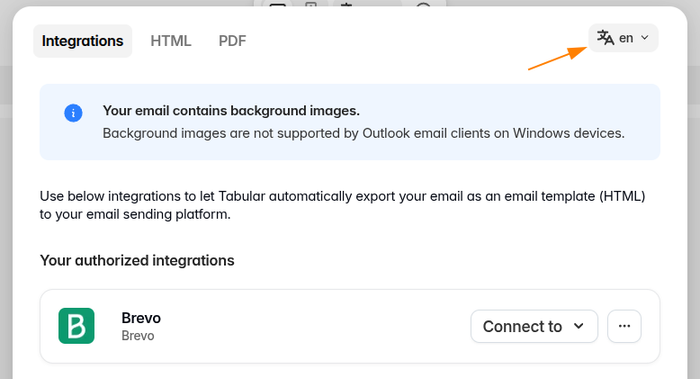
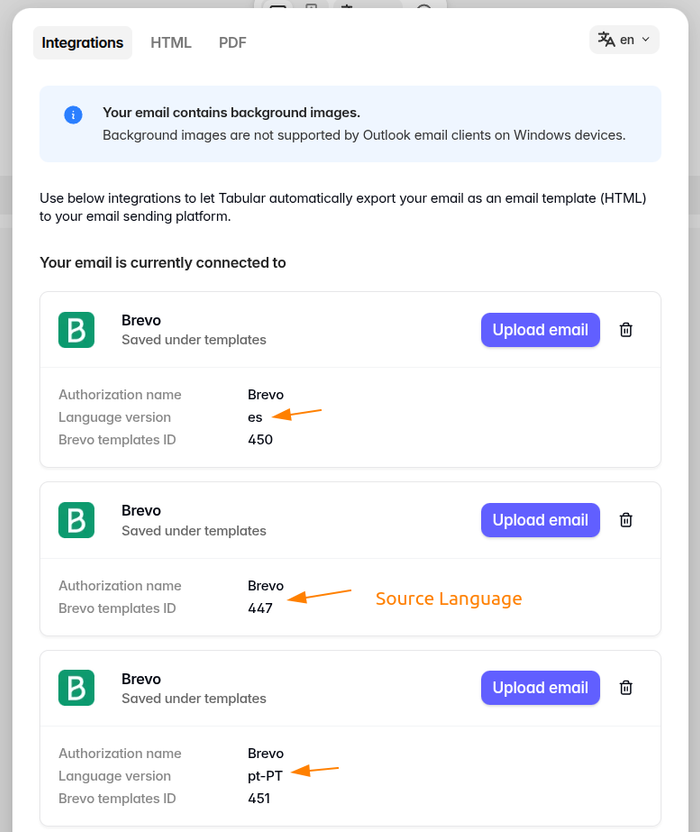
Example — Brevo Integration:
- Connecting to Brevo while in the Spanish version will sync only the Spanish template.
- If you need all language versions in Brevo, set up separate connections — one for each language.
- Each language in tabular.email corresponds to its own separate template in Brevo.
Current limitations
At the moment, translations only affect the text. The layout and images stay the same, and any links on buttons or images remain identical in all languages.
Community contributions
A big thanks to Christoph Dyllick-Brenzinger from SeaTable for writing this article.