
How to Choose the Best Email Template Builder
Table of contents
Email communication is essential in today’s market for direct communication with your users. However, it should also be a creative solution, and most of the time this is where the struggle begins. One broken layout or a single image that fails to load can easily damage your brand’s reputation.
Creating high-performing email templates requires time, experience, money, and often significant human effort. Fortunately, there are dedicated drag-and-drop email template builders that you can integrate into your workflow to achieve more efficient and reliable email communication.
While creating this list, I tested nearly every email template builder available on the market and consulted both business partners and real users. The goal is to help you understand how to choose the best email template builder for your needs, whether you are a business owner, marketer, designer, or developer.
A truly high-quality email template builder should meet the following criteria:
- Transparent pricing
- Hybrid HTML support
- Client supportability
- Easy-to-use design experience
- Responsive editing
- Direct integrations with sending platforms
- Collaborative workflow
How to Choose the Best Email Builder Tool
To detail these criteria further and understand how and why they are crucial when running a business, we need to analyze real use cases and common pitfalls. Let’s start by understanding the patterns that make an email builder truly effective.
1. Transparency In Pricing
Hidden costs and subscription fatigue are nothing new in the SaaS industry, and email template builders are no different. Let’s look at a few scenarios users have experienced with these dark, opaque pricing strategies to understand why transparency is the most important factor when evaluating an email template builder.
The "Accidental Enterprise" Bill
- A user invites a freelancer to edit just one file. They assume it's free or a small fee.
- The system silently upgrades the entire workspace or adds a recurring "Editor" seat for $15/month without a clear warning.
- Users report waking up to bills for hundreds of dollars because they "accidentally" added 5 team members months ago.
"I shared a file with a client for review and got charged for a full seat. I didn't find out until the annual renewal hit my card for $1,200."
The Silent Renewals
This is the most common complaint on Reddit.
- A user signs up for a "7-Day Free Trial." They enter their credit card. They forget.
- On Day 8, they are charged for a full year ($300+) instead of a month, because the default toggle was set to "Annual" during signup.
- Refunds are often refused because "it was in the Terms of Service."
"I thought I was signing up for $10/month. They charged me $140 instantly and their support said 'no refunds on digital goods'."
The Cancellation Maze
- You try to cancel a subscription.
- The Reality: You are forced to click through 4-5 pages of "Are you sure?" offers. In some notorious cases like A...... , users who cancelled early were hit with a "Early Termination Fee" of 50% of the remaining contract—sometimes costing hundreds of dollars just to stop using the software.
"I tried to cancel my $50/mo plan and they told me I owed them a $200 cancellation fee. I literally had to cancel my credit card to stop them."
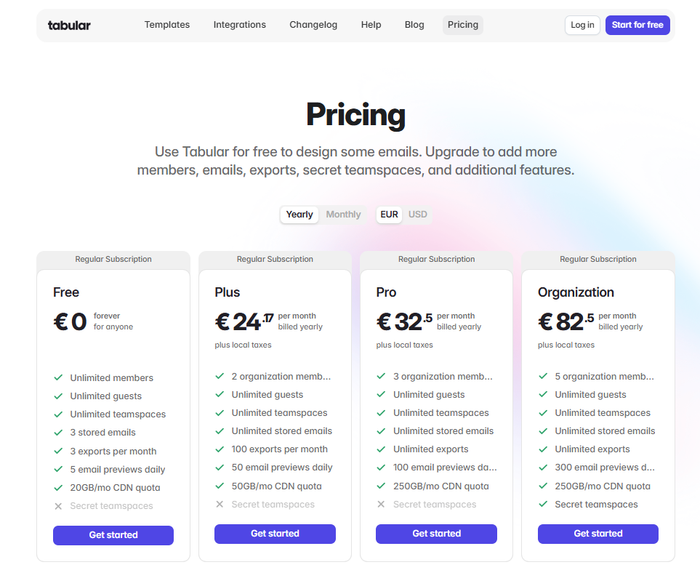
The Tabular Solution: Tabular breaks the industry mold by offering a Forever Free Plan that isn't a trap.
- 3 Exports Per Month: Enough for a freelancer or small business to run a monthly campaign completely free.
- No "Fake" Features: You get access to the full design engine.
- Transparent Limits: You get 20GB/mo of CDN bandwidth for free (which is massive for standard emails), and paid plans start with 50GB/mo. There are no hidden "overage" charges that appear silently on your bill.
- Key Takeaway: Look for a free email template builder that lets you download the file, not just look at it.
But how can you protect yourself from this billing mayhem, where many companies seem to trap users in complex pricing models? The solution is an online email creation tool called "Tabular".
Tabular is an excellent email builder tool that offers a lifetime free account. You can use almost all features without paying anything and export email templates in HTML or PDF, with no hidden costs.
Tabular’s pricing structure is designed to protect you from unwanted quota charges or feature-specific fees that can easily exceed the actual subscription cost.
Tabular's pricing structure is divided into three clear tiers (Free, Paid, and Organization) which protects you from unwanted quota charges, or feature specific costs that may outrun the actual subscription fee.
2. A No-Code Email Builder Should Be Easy to Use
Research highlights that the biggest barrier to software success is adoption. If a tool is powerful but difficult, only about 10% of a team (the experts) will use it. If it is easy to use, 80% of the team can adopt it. Same goes for email template builders, it should offer speed and freedom not another time consuming process.
The human brain has a limited "bandwidth." If you use most of your mental energy figuring out how to add a margin (fighting the tool), you'll only have 60% left for the actual design (creativity).
Tabular email builder is easy to use, offers flexibility in design, and supports advanced customization options without adding complexity.
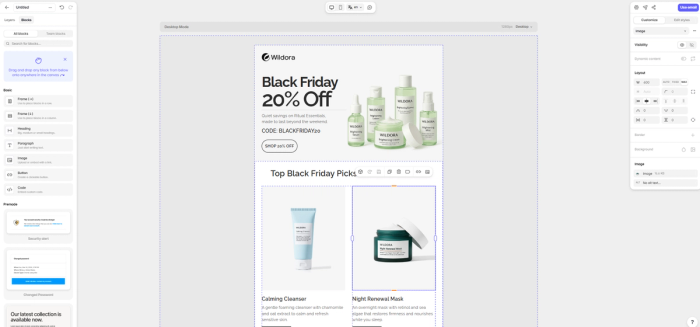
- In Tabular Email Editor everything feels immediately understandable with clear visual icons and plain-English labels to guide you naturally, so even non-technical users can start building professional emails right away, without training or tutorials.
- Tabular's email building interface only shows what you actually need. When you select an element, relevant settings appear and everything else stays out of the way. This keeps the interface clean, reduces mental overload, and makes building emails noticeably faster.
- Layer panel in the email template creator lets you work with nested elements easily. You can select, reorder, and adjust components without struggling on the canvas.
- Responsive design doesn’t require code. Simple visibility toggles and device-based controls make it easy to show or hide content based on context, allowing advanced behavior without technical complexity.
3. The Clean Code
Atomic CSS Architecture
Problem: Traditional email builders are inefficient. They repeat the same code hundreds of times (e.g., writing font-family: Arial on every single paragraph). This "bloat" slows down loading times.
Solution: Tabular's email design editor generates significantly lighter HTML for your email templates compared to its competitors. Tabular's html email templates loads faster, allowing you to include 3x more content without hitting file-size limits.
Gmail Clipping Prevention
Problem: This is the single most dangerous technical failure. Gmail has a strict limit: 102KB. If your HTML code exceeds this, Gmail literally cuts the email off and shows a "[Message Clipped]" link.
Solution: Because Tabular's html email template codes avoid repetition, it naturally stays well below the 102KB limit where Gmail cuts off messages.
Sub-Pixel Layout Precision
Problem: Design tools like Figma allow for fractional positioning (e.g., an image is 33.5px wide). Old builders round this down to 33px. In a row of 3 images, those missing 0.5 pixels add up to a visible 1px-2px white gap or "jagged" misalignment. It makes your brand look "cheap" or amateurish.
Solution: Tabular's html email builder utilizes fractional pixels (e.g., width="326.8px") rather than rounding numbers. This allows the email to honor the exact geometry of the original design file (Figma/Sketch).
Traditional builders force all measurements into whole integers (e.g., rounding 33.3% to 33% or 333px). This creates "jagged" layouts, 1px gaps between images, or slightly uneven columns.
Native CSS Mobile Logic
Tabular's responsive email builder uses a "State Switching" approach. It utilizes simple utility classes (e.g., .hd for Hide Desktop) linked to standard CSS Media Queries. This tells the browser to completely remove elements from the document flow (display: none !important).
Other builders use a "Simulation" approach. They attempt to hide mobile elements by manually setting height to zero, hiding overflow, and wrapping code in deep conditional tables.
HTML email templates created with Tabular's email template builder eliminates "Ghost Space" bugs (where hidden images still take up 1px-5px of space) and allows for granular control, letting you hide specific words or buttons without breaking the layout.
Design Flexibility: The "Figma-Like" Experience
The Pain Point: Standard builders force you into a rigid grid. You want to move an image 5 pixels to the right, but the tool won't let you.
What to Look For: Look for a no-code email editor that offers "canvas freedom." You should be able to place elements where you want them, similar to design tools like Figma or Canva.
The Tabular Solution: Tabular offers a modern UI that frees you from the "column jail."
- Precise Positioning: Move elements freely.
- Smart Responsiveness: While you have freedom, the tool automatically calculates the necessary table structure to ensure it renders correctly on devices.
- Interactive Elements: While the builder focuses on rock-solid stability, it allows you to insert custom HTML blocks. This means if you need a countdown timer or a live poll from a third-party provider, you can paste it in without breaking the rest of the design.
4. Is It Mobile Friendly and Multilingual
Most email template builders just "squish" your desktop design into a single column for mobile. It often looks cluttered and unreadable.
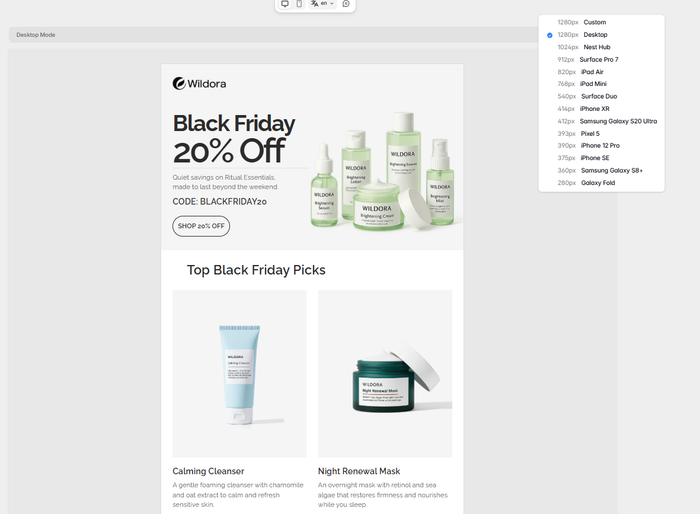
A mobile responsive email builder like Tabular allows you to design the mobile view separately.
Tabular allows you to create responsive html email templates with:
- Device-Specific Canvas: In Tabular's email editor, you can select specific viewports (iPhone 12, Pixel 5, iPad Mini) to see exactly how your email renders.
- Adaptive Content: You can hide complex desktop images and show simplified versions for mobile users.
- Localization: Tabular offers unique support for multilingual campaigns, allowing you to adjust visuals and text layout based on the language, ensuring your German template looks as good as your English one.
5. Integrations and Migrations
Users fear that if they cancel their subscription or get flagged, they lose all their templates.
The best dedicated online tool for email design offers a hybrid workflow: Direct integration for speed, and local file download for security.
You can manage your workflow safely by creating your html email templates with Tabular:
- The "One-Click" Workflow: Connect directly to 20+ major ESPs. You press a button, and the template appears in your dashboard.







- The "Owner" Workflow: You can download the full HTML of your email templates or transfer ownership between accounts.
6. Scalability: From Freelancer to Enterprise
Email design tools that are cheap for one person become incredibly expensive when you add a team member.
Email template creators with collaboration features allow you to scale up quickly, making your process professional.
Tabular's email designer platform allows you to:
- Create teamspaces and assign positions as admin, editor and viewer so only the designated users can see and customize the designs.
- Share folders including your email template designs with other users outside Tabular. This makes it a perfect choice for agencies and freelancers.
- Collecting feedback on your designs means meetings and availability, but with Tabular; you can collect user feedback just by sending them a live link and ask for comments on specific parts of design.
Conclusion: Tabular is the best email builder.
Choosing an email builder comes down to respect for the user. Does the tool respect your time (by not hiding costs), your skills (by offering clean code), and your freedom (by letting you export)?
Tabular ticks every box for the modern creator:
- Draft for free.
- Design like a pro (Figma-style canvas).
- Export with confidence (Clean HTML or Direct Integration).
Next Step: Don't take my word for it. Try Tabular's Drag and Drop Email Template Builder for free today