
10 Substack Alternatives That Will Increase Your Revenue Today
Table of contents
I think you’ll agree with me when I say:
It’s REALLY hard to build a sustainable writing business when you don’t own the platform.
Substack is easy to use, sure. But between the 10% revenue cut, the lack of SEO customization, and recent controversies regarding content moderation, many creators are looking for an exit strategy.
Well, while not as "one-click" as Substack, moving to a better alternative to substack can actually increase your take-home pay, protect your audience data, and give you true ownership over your content.
In this post, I’m going to break down the top platforms I’ve evaluated, why I recommend them, and how you can make the switch today.
Building your own newsletter platform? You'll want full design control. With Tabular's html email template builder, you can design and send beautiful newsletters without relying on third-party newsletter platforms.
Why People are Moving Away From Substack
Before we get to the list, we need to address the elephant in the room. Why are so many top writers fleeing the platform?
Relying on any third-party platform is risky. Publishing on your own blog is a long-term investment. When you own your site, your content works for you indefinitely.
Selling content on Substack is like selling a plot of land that could have turned into a thriving business. You are renting their infrastructure. If they change their algorithm, raise their fees, or shut down, you are in trouble.
The 10%
Substack takes 10% of your earnings. That doesn't include the Stripe processing fees (2.9% + 30 cents). If you are making $100,000 a year, you are handing Substack $10,000 just for the privilege of using a text editor.
Fortunately, if you can consider using or moving to a different newsletter service, there is no shortage of great alternatives.
The "Big Three" Direct Replacements
These platforms are the most common destination for writers leaving Substack. They offer similar "newsletter-first" functionality but with better business models as substack alternatives.
1. Beehiiv: The Best Alternative to Substack?
Best For: Creators who want to scale aggressively and monetize via ads.
If you are looking for a direct alternative that fixes Substack’s growth limitations, Beehiiv is the current industry leader. Built by the team behind Morning Brew, it is designed specifically to solve the "discovery" problem that plagues standalone newsletters.
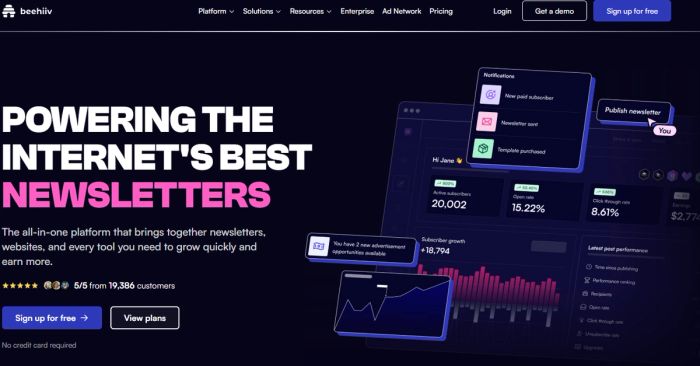
Why I Recommend It: I’ve tested Beehiiv extensively, and the biggest difference is the business model. Unlike Substack’s 10% tax, Beehiiv charges a flat monthly fee (or offers a free plan up to 2,500 subscribers). This means if you earn $100k, you keep $100k (minus Stripe fees).
Pros:
- 0% Revenue Cut: You keep all your subscription money.
- Ad Network: Beehiiv has a built-in ad network. You don't need to hunt for sponsors; the platform matches you with brands, and you get paid per open.
- Growth Tools: Features like "Boosts" allow you to pay other newsletters to recommend you, or get paid to recommend them. It’s a viral growth engine built into the dashboard.
- Referral Program: You can easily set up a "Milestone" system (e.g., "Refer 5 friends, get a free PDF").
Cons:
- Design Limits: While better than Substack, the email designer is still block-based and rigid.
- Gated Features: The best growth tools (like Boosts) are often locked behind paid plans.
- Learning Curve: The dashboard is denser than Substack's minimalist interface.
Verdict: If your goal is to build a massive media brand and monetize via both ads and subscriptions, Beehiiv is the superior choice.
You can create beautiful newsletter templates using Tabular’s drag and drop email editor easily in minutes. You can export these email templates and use them, which eliminates the only downside of "Beehiiv" as a "Substack" alternative.
2. Ghost: OWN YOUR BRAND
Best For: Writers who want full control, SEO dominance, and a custom website.
Ghost is open-source software, which places it in a league of its own. It is not just a newsletter tool; it is a full-blown content management system (CMS) built on modern Node.js technology.
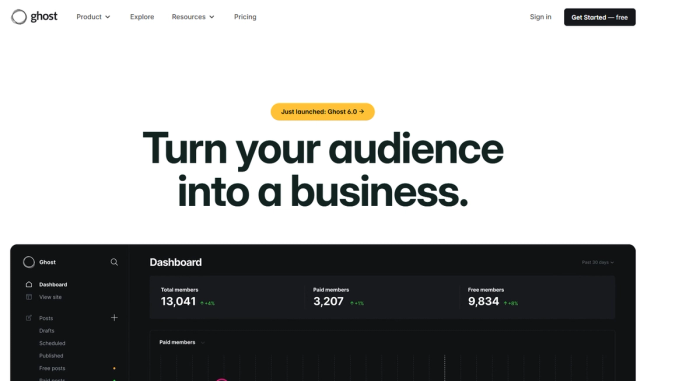
Why I Recommend It: A unique aspect of Ghost is that it allows you to build a "real" publication. When I look at Substack, I see a feed. When I look at a Ghost site, I see The Atlantic or The Verge. You can download Ghost for free and self-host it, or use their managed service, Ghost(Pro).
Pros:
- Complete Ownership: You own the code, the content, and the data. If Ghost(Pro) shuts down, you can take your site to any server in the world.
- SEO Powerhouse: Unlike Substack posts which live on a subdomain, Ghost sites are incredibly fast and optimized for Google.
- Fediverse Support: Ghost is rolling out ActivityPub support, meaning your newsletter can eventually "talk" to decentralized social networks like Mastodon.
- 0% Fees: Like Beehiiv, Ghost takes zero cut of your revenue.
Cons:
- Not a "Marketing" Tool: Ghost’s email features are basic. You can send posts, but you can’t create complex automation sequences or funnels.
- Technical Barrier: If you self-host to save money, you are responsible for server maintenance.
- No Native Community: Unlike Substack or Beehiiv, there is no "network" of Ghost blogs recommending each other by default (though they are building this out).
Verdict: The choice for the purist. If you want to build an asset you truly own, Ghost is the way.
Designing HTML emails with Ghost can be troubling, but you can create reliable and beautiful HTML email templates with Tabular’s email builder and export them as HTML.
3. Buttondown: The Minimalist’s Secret Weapon
Best For: Technical writers, developers, and privacy-conscious creators.
Buttondown is a hidden gem often mentioned in developer circles. It was built by a single developer who wanted a "no-nonsense" tool. It supports Markdown natively, making it a favorite for tech bloggers.

Why I Recommend It: If you hate the "growth hacking" vibe of Beehiiv and just want a clean place to write, Buttondown is it. It feels like the old internet—quiet, respectful, and functional.
Pros:
- Markdown Support: Write exactly how you code.
- Privacy First: It strips out tracking pixels by default and is GDPR compliant out of the box.
- Affordable: Great pricing for small lists, often cheaper than the big players.
- API: It has an incredibly flexible API, allowing developers to build custom archives or integrations.
Cons:
- Zero Design Frills: The emails are very plain. If you want a visual newsletter, this isn't it.
- Limited Features: No landing page builders, no complex funnels.
- Pricing Structure: As you scale, the "add-ons" for features can make the pricing structure feel a bit complicated compared to flat-rate tools.
Verdict: The best "indie" alternative. Perfect if you value text over flash.
Even though Buttondown is a good alternative, there is one huge con, which is design. But do not let this stop you. You can create HTML email templates that work everywhere using Tabular’s drag and drop email builder. It is easy to use and filled with pre made modules and ready to use newsletter templates.
The Marketing Powerhouses
These platforms are for creators who view their newsletter as a business funnel. If you sell courses, coaching, or physical products, "sending a newsletter" is just one part of your strategy.
4. HubSpot: The Enterprise Scaler
Best For: B2B newsletters and businesses that need a CRM.
HubSpot is often ignored by solo creators because of its price, but for a B2B newsletter, it is unmatched. It is not just an email tool; it is a Customer Relationship Management (CRM) platform.
Why I Recommend It: If your newsletter leads to high-ticket consulting sales, you need HubSpot. You can see every interaction a subscriber has had with your website, every email they opened, and every product they viewed.
Pros:
- All-in-One: Landing pages, email, chat widgets, and CRM all in one place.
- Personalization: You can use data from the CRM to personalize emails far beyond just "First Name."
- Smart Content: Show different blocks of text in your newsletter depending on who is reading it (e.g., show a "Buy Now" button to free users, and a "Thank You" message to customers).
Cons:
- Cost: The "Starter" plan is cheap, but the "Professional" plan (where the good automation lives) jumps to hundreds of dollars a month.
- Overkill: If you just want to write essays, this interface will drive you crazy with its complexity.
Even though HubSpot is a powerful marketing platform, creating and managing custom email designs can be limiting. With Tabular’s HubSpot integration, you can design responsive and reliable HTML email templates using Tabular’s drag and drop editor and upload them directly to HubSpot. This allows you to easily update, manage, and reuse email templates in your HubSpot campaigns, making email design faster, more flexible, and easier to scale.
5. Mailchimp: The Veteran
Best For: Small businesses and local newsletters.
Everyone knows Mailchimp. While it has fallen out of favor with the "creator economy" crowd, it is still a powerhouse for general business newsletters.
Why I Recommend It: Integration. Mailchimp integrates with everything. If you have an odd WordPress plugin or a niche e-commerce store, there is a 99% chance it connects to Mailchimp.
Pros:
- Design Builder: A very solid drag-and-drop builder that is easy for beginners.
- Generous Free Plan: Good for starting out, though they have tightened the limits recently.
- Analytics: excellent data visualization on open rates and click maps.
Cons:
- Anti-Affiliate: Mailchimp is notorious for banning accounts that do "affiliate marketing." If you aggressively push affiliate links, avoid Mailchimp.
- Pricing: It gets very expensive, very fast as you scale.
Pro Tip: Mailchimp’s native templates can get stale. You can refresh your look by importing custom Mailchimp HTML email templates.
The Budget & DIY Contenders
If you are cost-conscious or technically savvy, you can save a fortune by stepping away from the "managed" platforms.
6. MailerLite: The Best Value
Best For: Beginners and cost-conscious creators who still want features.
MailerLite is my top recommendation for people who want the power Mailchimp but don't have the budget.
Why I Recommend It: It is rare to find a tool that is both "cheap" and "good," but MailerLite is.
Pros:
- Free Plan: Includes automation features that other platforms charge for.
- Landing Pages: excellent landing page builder included for free.
Cons:
- Strict Approval: They are very aggressive about fighting spam. You might get rejected if you don't have a website or a clear plan.
- Support: Support on the free plan is limited/slow.
Even though MailerLite is easy to use and flexible, newsletter email design can still be limiting. With Tabular’s direct MailerLite integration, you can create responsive HTML email templates using Tabular’s drag and drop editor and upload them directly to MailerLite. This makes it easy to manage, update, and reuse email designs across your MailerLite campaigns while ensuring consistent rendering across email clients.
7. Sendy: The Dirt Cheap Self-Hosted Option
Best For: Developers and agencies.
Sendy is a piece of software you upload to your own server for a one-time fee ($69). It sends emails via Amazon SES (Simple Email Service), which costs pennies.
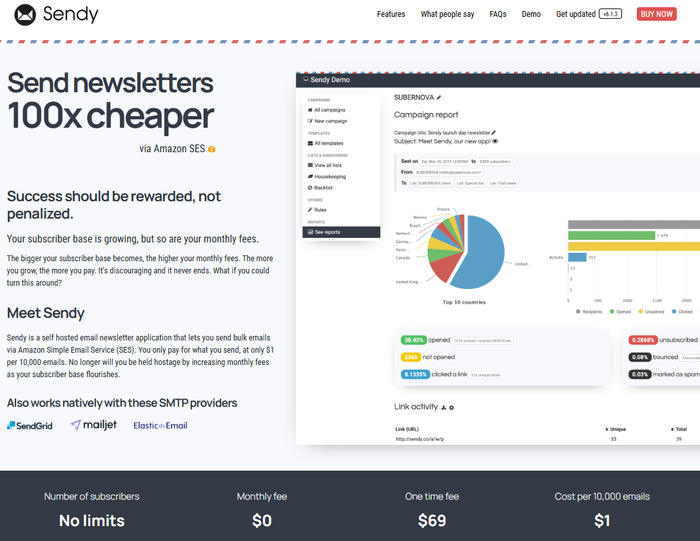
Why I Recommend It: Cost. Amazon SES charges roughly $1 for every 10,000 emails. If you have a massive list (100k+), Sendy will save you thousands of dollars a year compared to Beehiiv or Kit.
Pros:
- Insanely Cheap: You only pay for what you send, at Amazon's wholesale rates.
- White Label: You can brand it entirely as your own.
- Segments: Basic segmentation and autoresponders are included.
Cons:
- No Visual Builder: You generally need to paste in your own HTML. It does not have a fancy drag-and-drop designer.
- Zero Support: If it breaks, you fix it. You are the IT department.
Pro Tip: Even though Sendy is a cost-effective email solution, designing HTML emails can be challenging. With Tabular’s direct Sendy integration, you can create responsive email templates for Sendy using Tabular’s drag and drop editor and export them straight to Sendy. This allows you to quickly manage, update, and reuse your email designs while ensuring they look great across all devices and email clients.
8. listmonk: The Open Source Rebel
Best For: Hardcore developers and privacy advocates.
"listmonk" is a standalone, self-hosted newsletter manager. It is fast, packed with features, and completely free (open source).
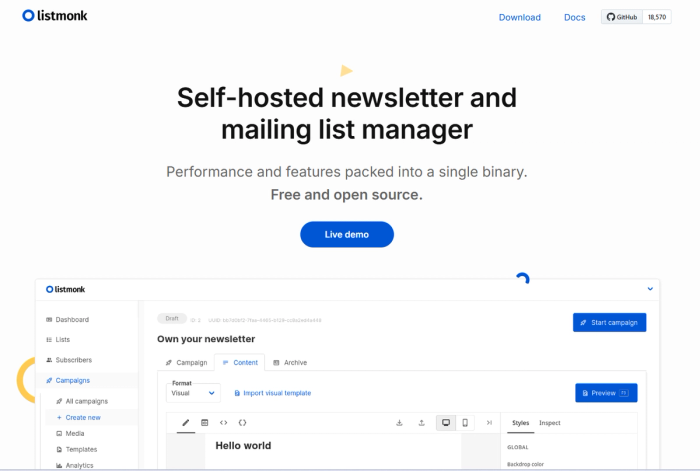
Why I Recommend It: It’s a single binary. It’s incredibly performant. If you have a list of 10 million subscribers, listmonk can handle it without breaking a sweat.
Pros:
- Performance: Unmatched speed for massive lists.
- Free: Open source license.
- Data Ownership: You own the database (PostgreSQL).
Cons:
- High Technical Barrier: You need to know how to set up a server, manage a database, and configure SMTP.
- Basic UI: It is a functional tool, not a pretty one.
Even though Listmonk is a solid self-hosted newsletter platform, designing HTML emails can be tricky. With Tabular’s direct Listmonk integration, you can create beautiful and reliable email templates using Tabular’s drag and drop editor and export them straight to Listmonk. This makes it easy to manage, update, and reuse your email designs across campaigns.
Not knowing which design to start with? Check out our article on the 10 best
free editable newsletter templates for more inspiration.
The E-Commerce & Membership Specialists
Sometimes a newsletter isn't just a newsletter—it's a storefront.
9. Klaviyo: The Shopify Companion
Best For: E-commerce brands.
If your newsletter exists to sell physical products on Shopify, do not use Substack. Use Klaviyo.
Why I Recommend It: Klaviyo pulls in all your store data. You can send a newsletter that says, "Hey, I saw you looked at these sneakers but didn't buy them. Here is a 10% coupon."
Pros:
- Deep Data: The segmentation is based on actual money spent.
- ROI Tracking: You can see exactly how many dollars each newsletter generated.
Cons:
- Expensive: It is priced for brands making money, not hobbyists.
- Design: The editor can be finicky.
Klaviyo is a powerhouse for e-commerce email marketing, but design can be a simple flaw. You can fix this using Tabular’s drag and drop email creator, which offers a direct integration with Klaviyo.
Not converting enough in your e-commerce email flows? Try one of these Klaviyo abandoned cart email templates from Tabular to turn that undecisive viewer to a long time customer.
The Niche & Platform Specifics
10. Medium
Best For: Discovery. Use Medium to get famous, not to get rich. You don't own the list, and you can't export the emails easily. It is a discovery engine, not a retention engine.
The Trade-off
I started blogging actively on Medium years ago. It’s great for virality. But here is the catch: You don't own the audience. Medium controls the relationship. You cannot easily export the emails of people who follow you on Medium.
Use Medium to find readers, but try to funnel them into a list you own.
Deep Dive: The Advantages of Running Your Own Newsletter With a Custom Domain
You will notice a theme in the list above: Ownership.
The single biggest mistake I see new writers make is building their empire on a Substack subdomain (e.g., yourname.substack.com).
Based on general SEO principles, email marketing mechanics, and the "rented land" arguments from our sources, here is why you must use a custom domain (e.g., newsletter.yourname.com).
1. You Build "Real Estate," Not Just Traffic
From an SEO perspective, using a platform's domain is like renovating a rented apartment. Using your own domain is building equity in a house you own.
- Domain Authority (DA): Every time someone shares your newsletter archive or links to your post, they generate a backlink. If you use
substack.com, that "link juice" boosts Substack's authority, not yours. If you use your own domain, those links build your site's authority, helping all your future content rank higher on Google. - Traffic Retention: When your newsletter lives on your domain, search engines send organic traffic directly to you. This allows you to capture that traffic for other purposes—like browsing your services, products, or other articles—rather than losing them to Substack’s "More from..." sidebar.
2. Protection From "De-platforming"
if you disagree with a platform's ethics or if they decide to ban you, you are out of luck if you are on their domain.
If you own the domain, the platform is just a backend utility. If Beehiiv goes down or changes its rules, I can export my list, upload it to Ghost, point my domain to the Ghost servers, and my readers never even know the difference. My URL stays exactly the same.
3. Professional Trust & Deliverability
An email coming from editor@techinsights.com is perceived as significantly more authoritative than techinsights23@gmail.com or techinsights@substack.com. It signals that you are a business, not a hobbyist.
Furthermore, using your own domain allows you to set up specific authentication protocols (DKIM, SPF, DMARC). This tells Gmail and Outlook, "I am who I say I am," which significantly reduces the chance of your newsletter landing in the Spam folder.
Final Words
I hope today’s post showed you that there is life after Substack. You don't have to pay a 10% tax or worry about content moderation policies that don't align with your values.
Now I want to turn it over to you:
Which of the 11 alternatives from today’s post are you going to try first?
Are you going to chase growth with Beehiiv?
Or maybe you want the total ownership of Ghost.
Either way, let me know by leaving a comment below right now.
Related Resources
- Newsletter Design Best Practices: Learn how to make your emails visually appealing and effective.
- Email Newsletter Templates – Browse ready-to-use templates to speed up your newsletter creation.
- Best Email Headers – Discover how to design best email banners.
- Email CTA Best Practices – Optimize your calls-to-action to drive clicks and conversions.
- Email Customer Journey Mapping – Map your customer journey to send the right email at the right time.