
What is an Email Builder? The Solution to No-Code Email Design
You probably already know that the average return on email marketing is $36 for every $1 spent. It is still the best digital marketing ROI.
But there is a huge problem that most marketing experts don't talk about: coding HTML emails is like being in "Production Hell."
You know how it feels to try to make an email look good in Apple Mail and then have it break completely in Outlook or Gmail. Email clients are stuck in the past, using rendering engines from the late 1990s. The web has changed a lot since then. This means that developers have to use old-fashioned table-based HTML, inline CSS, and complicated hacks just to show a simple button.
The email builder exists because of this technical problem.
What does an email builder do?
An email builder is a visual, no-code software platform that lets users create, build, and export professional HTML email templates without having to write code.
You could say that email builder software is like a very smart translator. You talk to the builder in design language by dragging things around, picking colors, and setting margins. The builder then turns those instructions into the messy, complicated "Email HTML" that inboxes understand.
But a modern, professional email builder like "Tabular" does a lot more than just translate. It is a complete design system, a place for people to work together, and a tool for checking the technical quality of work all in one. It changes a process that used to take developers days into one that a marketer can finish in minutes.
Why you need an email builder?
You need to know what kind of environment the email builder tool works in to understand why it's needed.
The Issue: The Rendering
Email clients are fighting, but web browsers like Chrome and Safari usually agree on how to show a website.
- Apple Mail uses WebKit, which is modern and supports HTML5 and video.
- Gmail takes out <style> blocks from the head and has strict file size limits (it clips emails that are more than 102KB).
- Microsoft Word's rendering engine is used by Outlook (Desktop). Yes, your code is being rendered by a word processor. It doesn't pay attention to common CSS properties like border-radius, background-image, and flexbox.
To meet these clients' needs, you have to write three different versions of the code by hand.
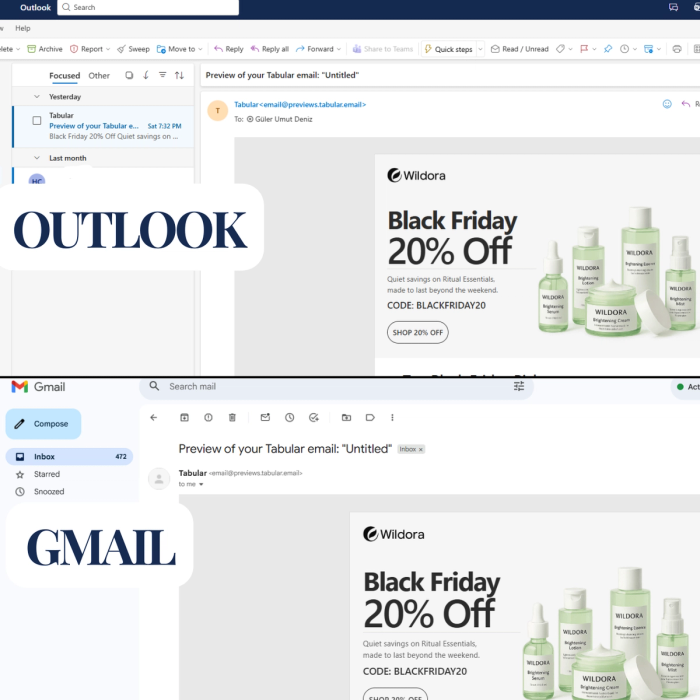
The "Hybrid" Approach is the answer.
This is done automatically by a top-notch online email builder like Tabular. The system isn't just writing a <div> when you drag a button into Tabular. It is making the following things behind the scenes:
- Apple/Web uses standard HTML and CSS.
- Gmail has structures based on tables.
- Code in VML (Vector Markup Language) just for Outlook.
This makes sure that your email layout builder output is "bulletproof," meaning it will look the same on all platforms without you having to touch a line of code.
Important Features of the Best Email Builder
If you're looking at email template builders, don't settle for the basic editor that comes with your Email Service Provider (ESP). Those are often "block stackers" that are very rigid. The best dedicated email builder gives you fine-grained control and workflow tools that can grow with your needs.
1. The Drag and Drop Builder
Most basic builders make you use a grid that has already been set up. You can't change the space between a headline and a subheadline without adding a big spacer block.
Tabular uses a real visual email builder interface that is based on the CSS Box Model.
Control with precision: You can change the padding and margins (top, bottom, left, and right) for each element separately.
Auto vs. Fixed Widths: Tabular lets you switch between Auto Width (the block gets bigger as you add content), Fixed Width (the block stays the same size), and Max Width (the block is responsive and fluid).
This lets you make layouts that are more complicated and look like magazines, which breaks the "grid" look of regular templates and makes your brand stand out.
2. Real responsive design and mobile optimization
When you look at standard builders on a mobile device, they just stack columns. That is "responsive," but it isn't "optimized."
A responsive email builder lets you control things conditionally.
Styling for Mobile: You can switch to Mobile View in Tabular and change the font size of your H1 header so that it doesn't take up the whole screen.
Hide/Show Logic: On mobile, you can choose to hide a large desktop hero image and replace it with a smaller, faster-loading one.
Word-Break Styling: Long words, like URLs or German compound nouns, often mess up layouts on mobile. Tabular lets you set word-break or nowrap rules for certain text elements so that layouts don't change on small screens.
3. Blocks that can be used again and again and modular design
Creativity and efficiency don't go together, unless you have a modular email builder.
Tabular lets you make a Design System so you don't have to start from scratch every time.
- Blocks that have been saved: Make your complicated footer (with legal text, social media icons, and links to unsubscribe) once, save it, and then drag it into every email you send.
- Teamspace Styles: Set the colors and fonts (H1, H2, and Paragraph styles) for your brand all over the world. You can change the color of your main button from blue to red by updating the Global Style. This change will show up in all of your work.
Why this is important: This makes sure that the brand stays the same. The system makes sure that a junior marketer can't use the wrong shade of blue or the wrong font size by mistake.
4. Advanced Typography (Fonts You Make Yourself)
90% of email design is typography.
Tabular Web Fonts lets you import Google Fonts, Adobe Fonts, or host your own font files.
Fallback Stacks: This is very important. Outlook doesn't let you use custom fonts, but Tabular does let you set up a "Fallback Stack" (for example, Helvetica > Arial > Sans-Serif). The builder automatically codes the conditionals so that Apple users see your custom font and Outlook users see a clean alternative instead of Times New Roman.
5. Managing templates in more than one language
For companies that do business all over the world, localization is a nightmare because they have to make 10 copies of templates for 10 languages.
Tabular has a one-of-a-kind feature called Multi-language Email Template.
You make one master template that is the only source of truth.
Switch Language: You can switch between "English" and "Spanish" or "French" in the editor. You change the text and pictures for that language layer.
Export: When you export to your ESP, the system treats them as separate assets or dynamic versions. This means you don't have to deal with a lot of HTML files.
6. Working and editing together
It's not common for one person to design an email. It includes copywriters, designers, and people who have a stake in the project.
Real-time commenting: Tabular lets team members drop pins on certain things (like "Make this logo bigger") and settle threads.
Roles and Access: You can use the Organization Plan to decide who is an Admin, an Editor, or just a Viewer. If you're an agency, you can even make Secret Teamspaces to keep client data separate.
Links to Public Demos: Don't take screenshots of your emails to show your boss. Make a live URL that shows the email in the browser for approval.
7. Integrations: The ecosystem of a Professional Email Builder
Many people think that using an outside email design tool makes things harder ("I have to download the HTML and upload it myself"). Modern builders use APIs to get rid of this problem. Tabular works with more than 20 major platforms and acts as the "design engine" that connects to your "sending engine."
Integrations for Marketing ESP
Klaviyo: Tabular is an official partner. You can put templates right into your "Flows" or "Campaigns." Get your Klaviyo abandoned cart email template and don't leave any sale unfinished.
Mailchimp and HubSpot: With direct sync, you can overwrite existing templates. This means that if you find a typo in Tabular, you can fix it and send it to HubSpot right away.







Integrations for transactional email
Transactional emails, like password resets and receipts, are often the ugliest emails a brand sends because developers hard-code them.
Tabular works with Postmark, SendGrid, Amazon SES (through Sendy), and ZeptoMail.
Pro Tip: Developers can use the Tabular API or basic authentication webhooks to get the HTML right into their app. This lets marketing teams design transactional emails without having to ask a developer to write code.
Technical Deep Dive: Why Tabular is the "Best Email Builder" for Some Clients
The Gmail Challenge (CSS and Clipping)
The Problem: If your HTML code is bigger than 102KB, Gmail "clips" the email, hiding the footer (and your unsubscribe link) behind a "[Message Clipped]" link. This breaks open tracking and makes it less likely that your email will get through (spam filters don't like hidden unsubscribe links).
The Fix: Tabular's email builder software makes code that is minified and works well. It doesn't have the "code bloat" that older drag-and-drop builders do, so your templates stay light and won't get clipped.
More advanced strategies: Dynamic Content and Personalization
1. Variables and Backups
You can mark text as a variable right in the editor, like this: {{first_name}}. You can set "Display Values" in Tabular (like "John") to see how the length of the name affects the design as you build it.
2. If/Else Logic
You can use logic blocks on any part.
For example, {% if customer.status == 'VIP' %} Show the Gold Banner {% else %} Show the Standard Banner {% endif %}.
Tabular makes the visual wrapper for this logic so that the HTML structure stays intact.
3. Looping (The E-commerce Superpower)
You can't tell if a user bought 1 item or 10 from an Order Confirmation email.
Loops work with Tabular. You make one "Product Row" with an image, a title, and a price.
You use the loop tag {% for item in cart.items %}.
When you send the email, it automatically repeats that row for each item in the cart. This is very important for serious e-commerce businesses that use Shopify or Klaviyo.
Final Words
In 2026, having "great copy" isn't enough to give you an edge in email marketing. You also need to be fast and have experience.
You win if your competitor takes three days to code a newsletter and you can make a better-looking, mobile-friendly, dark-mode-compatible version in 30 minutes using an email builder platform. You go through the process more quickly. You do more tests. You get bigger faster.
Tabular has become the best email builder for professionals by admitting that email design is a technical field and then hiding that complexity behind a beautiful interface.
If you're a freelancer who needs a free email builder to get started or a business that needs a strong email campaign builder with role-based security, switching to a specialized tool is the best thing you can do for your marketing stack.
Are you ready to stop fighting with code?
Start using Tabular to design today and see how a professional, hybrid-code email engine can make a difference.
Common Questions (FAQ)
What sets an email builder apart from an ESP?
An ESP, or Email Service Provider, like Mailchimp, sends the email and keeps track of the lists. An email builder, such as Tabular, is a design tool that is only used to make HTML content. ESPs come with built-in editors, but specialized builders give you more control over the design, guarantee rendering, and workflow features.
Is Tabular a free tool for making emails?
Tabular has a great free tier that lets you make and send emails. Premium plans are available for advanced features like unlimited exports, team collaboration, and workspaces for organizations.
Is it possible to add my own HTML to an email builder?
Yes, you can add Custom Code blocks to Tabular. This is great for adding specialized scripts or interactive elements like countdown timers that come from other tools.
Does this work for emails that are part of a transaction?
Of course. Tabular is probably the best email layout editor for keeping your brand consistent in both marketing and transactional emails because it works with Postmark, SendGrid, and Mailgun.