
How to Create Marketing Emails the Right Way
Table of contents
A marketing is the collection of different types of emails you send to number of recipients with the goal of promoting your product or service.
This article covers how to create marketing emails, what are the different types of emails used for marketing, what are the triggers and flows that makes these emails effective, best practices when creating a marketing email and things you should check before sending like compliances and spam filters.
Emails are the most direct channel of communication between brand and their users and customers, so much so that an academic research from 2022 proved that email holds the most interaction with 22% open rate which is unreal for other marketing channels.
Why do you need to create marketing emails:
- Unlike social media platforms and search engines, algorithm change can can not affect your reach, you own your email list.
- It's cost efficient and you don't have to pay to win to reach people.
- You can target people who already have an interest in your brand based on their behaviors.
- Email marketing is the most effective channel for getting back lost customers with re-targeting campaigns.
How to Create Marketing Emails Step by Step
There are two main stages of creating marketing emails: writing the sales email and designing the html email templates.
In order to successfully execute these steps you need to:
- Identify your goal
- Segment your list
- Create email templates
- Make sure that your emails are delivered
Step 1: Identify The Goal of Marketing Emails
Just having a good idea and intent is not enough to make marketing emails effective. You need a measurable outcomes and indicators to track the performance of your marketing emails.
- The business goal: This is where you aim for the revenue, user growth or the brand authority.
- Example: Increase the number of monthly active users for my software tool.
- The campaign goal: This is how you expect email marketing the help achieving that business goal.
- Example: Creating onboarding sequences to welcome users to my software with guides and tips on how to use.
- The primary Key Performance Indicators: This is the data that you'll follow to understand if the marketing emails are working.
- Example: The percentage of users who clicked the "create and account" button.
Let's sat that you've implemented a new feature for your software and want to share that with your ongoing userbase.
Your business objective in this scenario is to get current users to try this new feature.
Your key performance indicator can be the users coming from marketing emails to a specific page.
But still you need to put into numbers to create measurable email marketing campaigns, which can be:
- Increase the number of good reviews with this new feature.
- Get 500 users to try the new feature in 2 weeks.
- Introduce the newcomers to the new feature through welcome emails and current users with newsletters.
Intent of the emails has to match the stage where the user is, based on this marketing emails fall into three main categories: Transactional emails, Promotional emails and Promotional emails. Make sure to create email templates for all these categories.
Types of Marketing Emails
Promotional Emails
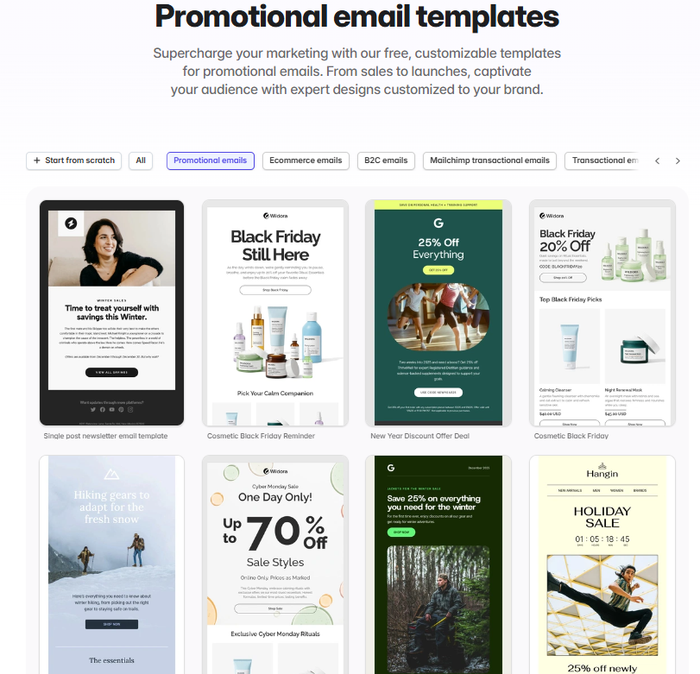
Promotional emails are created to attract immediate action towards revenue. These emails can be:
- Seasonal sales emails: These emails aim to target high intent users in a specific season where fear of missing out drive the purchase decisions. These emails can be: Black Friday Emails, New Year Emails.
- Abandoned cart emails: Abandoned cart emails are great way to persuade undecisive users to take the purchase decision.
Transactional Emails
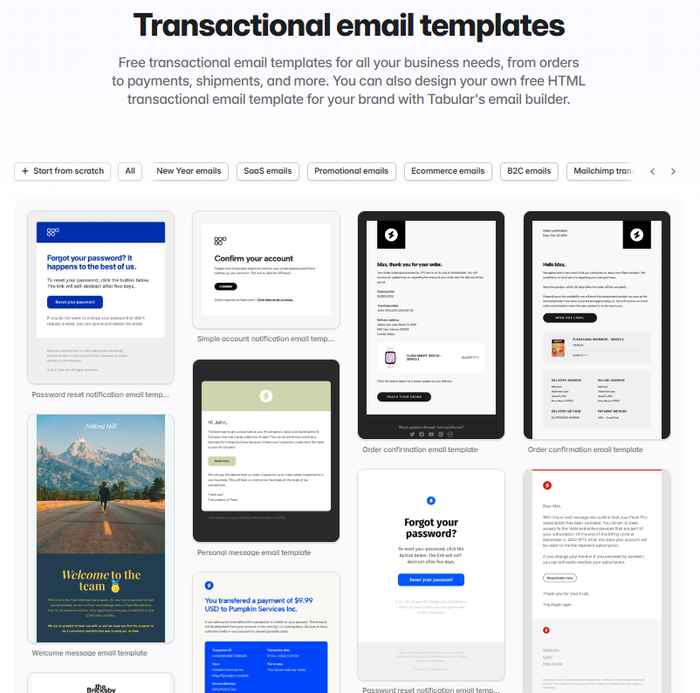
Transactional emails are functional emails that sent after a completion of an action like opening and account or making a payment. Even though they can't drive revenue directly it's high important for brand authority and closing the knowledge gap between users and the brand. You can still drive revenue through transactional emails by offering benefits. for example: An onboarding sequence for a user that signs up for the demo gets a discount code.
Relational Emails
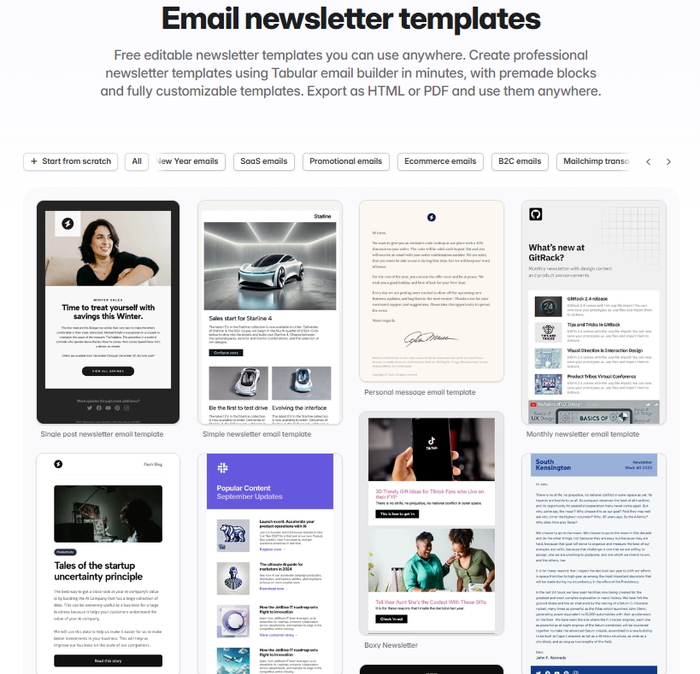
To position your brand as "user friendly" you need to build a long lasting relationship with your users. Relational emails are great for building relationships and increasing brand authority through good review and feedbacks. Relational emails can be: Newsletters or Win Back Emails. If you are offering software services or in a field that authority is crucial, creating newsletters is very important.
| Email Type | Goal | Audience | Timing |
|---|---|---|---|
| Welcome | Onboarding | New Signups | Instantly |
| Abandoned Cart | Revenue Recovery | Interested Shoppers | 1-24 hours later |
| Newsletters | Retention | Entire Active List | Weekly/Monthly |
| Seasonal Sales | Rapid Sales | Potential Leads | Specific periods |
Step 2: Segmenting The Email List
Segmentation is the process of grouping users by their characteristics and it is as important as creating the actual email templates for marketing. Each group needs to be shown a different value to increase the effectiveness of your marketing emails.
Creating marketing emails for different audience segments and creating the right CTA for email templates is an essential part of marketing email campaigns.
User segmentation too big of a concept to write in this chapter, but to showcase better, here is an example on how segment your email list based on behavior:
- Power user: Users that are actively using the platform.
- Stuck user: Users who used the platform once and abandoned without completing the action.
- Inactive users: User in the email list who haven't opened the last 20 emails.
Step 3: Defining Triggers
In trigger based email marketing, emails are sent after specific actions or milestones. You can think of these as automated checklists for engaging with your users and customers.
Trigger examples for creating marketing emails:
- Browsing a page: When a logged in user checks a product page, an automated email will be sent including similar products.
- Purchase: When user completes a transaction, send a confirmation email with the details and next steps.
- Renewal: When a user close to the end of subscription period, send an email to remind about the renewal.
Step 4: Creating Marketing Email Templates
Marketing emails are created using HTML and CSS. They express the identity of the brand through colors and design elements like logos and brand fonts.
Especially in ecommerce, HTML email templates allows businesses to showcase products with quality images and engage with users through dynamic content like personalized collections and CTA buttons.
HTML and CSS used in creation of marketing emails is different from the ones that you use for websites. It is significantly hard and requires expertise along with time and money. Using an email builder makes this process a lot easier.
Emails are an image of your brand, it represents your identity in the closest way possible. When creating your marketing emails, every details matters but we tried to list the most important ones for you:
Brand Style and Assets
Consistency in design is everything for marketing emails. Tabular's email builder allows users to create a library of default styles for headings, paragraphs, buttons and images. Any change you make automatically syncs with other templates.
You can also save specific design elements like your buttons, headers and footers to use in other templates. This makes the process of making marketing emails much faster and professional.
Email Layout
Scanning and reading are different things and you can't expect from users to carefully look at every detail in you emails. When creating you marketing emails, use white space to make important section stand out like your CTA, product visuals or the headlines.
Mobile first approach is not only for websites, your emails are also opened on mobile. Tabular's email builder allows you to create different designs based on language and screen size, making sure your designs don't break on different devices and stay professional in different markets.
Tabular's email template maker is known with it's ease of use when creating marketing email templates. Figma-like email editor allows you to design marketing emails with drag and drop interface and layered structure.
Personalization and Dynamic Content
Personalization is a magnificent tool that allows your brand to stand out in highly competitive markets, especially in ecommerce.
With Tabular's email builder, you can use variables like "{{ first_name }}" to create personalized text content in your email templates. This way you can use one email template for each segment without compromising from sincerity.
But personalization goes beyond names, offering a collection of products based on user journey is where marketing emails shine.
When creating your ecommerce email templates with Tabular email builder, use dynamic content to add conditional rules and give the users what they are interested in.
Collaboration
We mentioned that building email templates requires a good copywriting for sales along with design. This requires a collaborative effort from writers, marketing specialists and designers.
If you create your emails with Tabular, you can comment on specific design elements, share live demos with your team and manage your email template gallery much more efficiently.
HTML and CSS for Marketing Emails
We mentioned the challenges of creating marketing emails using HTML and CSS, email builders have to perform but generating the suitable codes that works across all email clients and devices, otherwise you can say goodbye to your brand reputation.
Tabular's email builder is created to prevent that problem. After years of testing and developing and constant improvements. You can generate perfect HTML email templates that works seamlessly even in older versions of Outlook.
You can also save the email templates you built with Tabular as PDF and use it that way.
Images in Marketing Emails
Marketing emails require quality images. Due to the limitations of major clients like gmail and outlook, CDN is the best way to add images to your marketing emails.
If you want to host your own images, you'd need a web server. If you create your marketing emails with Tabular's email builder, you can benefit from its high speed CDN servers and generous quota so you can showcase high quality product visuals.
Takeaways
- Email marketing is a direct communication between your brand.
- Email marketing is more stable than other digital channels since there are no algorithm changes that can affect your visibility.
- Every email marketing campaign needs measurable outcomes and business goals.
- A good marketing campaign contains strong templates for promotional emails, transactional emails and relational emails.
- Segmenting your list based on behaviors makes your marketing emails more effective and efficient.
- Triggers for specific user actions and milestones helps your brand stay in mind during purchase decisions.
- Visual consistency means professionalism.
- For successful marketing emails, personalization is a must.
- Email builders make the process of creating marketing emails time efficient and cost efficient.