
HTML vs. Plain Text Emails: Which Format Converts Better
In marketing, we often get stuck in a debate between "form" and "function." Designers want emails to look like high-end attractive magazines while copywriters want them to read like personal letters.
As a marketing manager, your job is not to pick the prettiest option. Your job is to pick the one that converts.
This guide analyzes the difference between HTML emails vs. Plain Text emails using industry data, psychological insights, and practical use cases. By the end, you will know exactly which format drives the results you need.
Choosing between HTML and plain text? Most campaigns benefit from html email templates that combine visual appeal with clean fallbacks. Tabular's library includes both rich designs and simple, text-forward templates for every use case.
The Core Difference
- Plain Text Emails: These are stripped-down messages. They contain only text and links. They rely entirely on the power of your email copywriting to persuade the reader.
- HTML Emails: These use code (HyperText Markup Language) to create structure. They allow for images, colors, distinct layouts, and buttons. They function like mini-webpages inside the inbox.
The Data: What Actually Works, HTML Emails or Plain Text?
Marketing teams often assume that high-design emails perform better because they look "professional" but not for every case.
HubSpot and other major platforms have run extensive A/B tests on this. Here is the general consensus on performance:
| Metric | HTML Email | Plain Text | What you should use |
|---|---|---|---|
| Open Rates | 25% or lower | Around 42% | Plain Text |
| Click-Through Rate | Lower link engagement | 17-21% Higher | Plain Text |
| Deliverability | Higher spam risk | Near 100% | Plain Text |
| Branding | High (Logos, Colors) | Low (Signature only) | HTML |
| Conversion (Sales) | Lower response rate | Higher reply rate | Plain Text |
| Conversion (E-comm) | Higher sales volume | Lower sales volume | HTML |
HubSpot A/B tests found that while people say they prefer images, they actually open and click text emails more often.
Deliverability: Spam filters look for "commercial" signals. Heavy code and images trigger these filters. Plain text slips through to the primary inbox.
The Marketing Manager’s Takeaway: If your goal is brand awareness (visuals), use HTML.
If your goal is direct response and communication (clicks and replies), use Plain Text. For example, if you are promoting a sale, use HTML for better brand identity and engagement, but if you are notifying users about a policy change, plain text email is the go-to option.
The Case for Plain Text
Plain text is the format of "real" communication. It is how you email your boss, your colleagues, and your friends.
1. The Trust Factor
When a prospect sees a highly designed email, their brain immediately categorizes it as "Marketing." Their guard goes up. When they see a plain text email, it feels like a 1:1 conversation. This is why B2B email marketing relies so heavily on text-based outreach.
2. Deliverability Dominance
Spam filters are aggressive. They look for messy code, heavy images, and "promotional" language. Plain text emails bypass these technical hurdles easily. If you are struggling to reach the inbox, switching to text is often the first step in fixing your sender reputation. (Resource: Review our Email Deliverability Checklist to troubleshoot your current standing.)
3. Mobile Perfection
You never have to worry if a text email will break on an iPhone or an Android. It flows naturally on every screen size.
Here is a comprehensive guide written from the perspective of a Communication Specialist and Marketing Manager. It is designed to be a high-value blog post that balances strategic insight with tactical advice, integrating relevant internal links from your sitemap to boost your SEO structure.
- text and links. They rely entirely on the power of your email copywriting to persuade the reader.
- HTML Emails: These use code (HyperText Markup Language) to create structure. They allow for images, colors, distinct layouts, and buttons. They function like mini-webpages inside the inbox.
The Case for HTML Emails
HTML is the format of "experience." It allows you to control the user's journey and emotion through design.
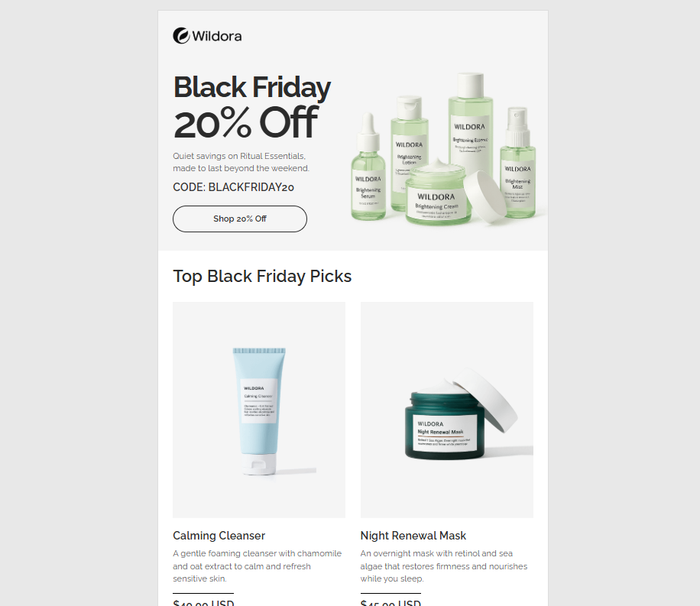
1. Visual Selling
You cannot sell a sweater by describing the wool. You have to show it. Ecommerce email marketing requires HTML because the product is the visual.
2. Scannability
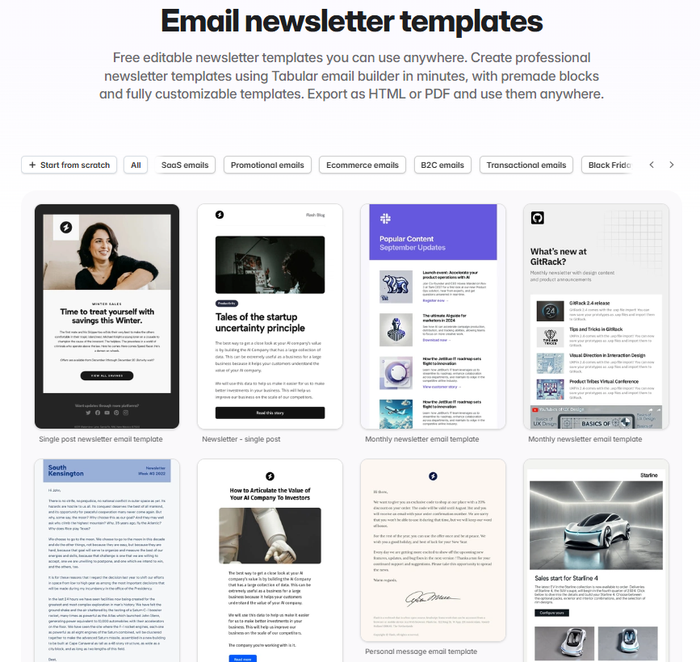
A wall of text can be intimidating. HTML allows you to use positive and negative space to break up content. You can create distinct sections, making it easier for the reader to scan a long newsletter in seconds.
3. Tracking and Analytics
HTML allows for more robust tracking. You can see heatmaps of where people clicked and exactly when they opened the message. This data is vital for tracking your 7 email campaign metrics.
The Strategic Decision Matrix
Do not guess. Use this framework to decide which format fits your current campaign.
Scenario A: The "Cold" Outreach
- Goal: Get a meeting or a reply.
- Format: Plain Text.
- Why: You are a stranger. High design makes you look like a generic ad. Text makes you look like a human being solving a problem.
- Tip: Use best email subject lines for sales that sound conversational, not salesy.
Scenario B: The Product Launch
- Goal: Generate excitement and impulse buys.
- Format: Rich HTML.
- Why: You need to create "desire." Use high-quality images and a bold "Buy Now" button.
- Tip: Ensure you follow accessibility best practices in email design so screen readers can describe your product images to visually impaired users.
Scenario C: The Transactional Alert
- Goal: Inform the user (Password Reset, Order Confirmation).
- Format: Light HTML.
- Why: You want it to look official and trustworthy (branding matters here), but you do not want distractions.
- Tip: Read our guide on how to design transactional emails for specific templates.
The Hybrid Approach: The "Goldilocks" Solution
If you cannot decide, use the Hybrid method. This is a strategy I recommend to many clients.
A Hybrid email is technically an HTML email, but it is styled to look like plain text.
- Background: Pure white.
- Font: Standard size and color (black on white).
- Layout: Single column.
- The Trick: It includes a hidden tracking pixel and perhaps a polished HTML signature with your headshot.
This gives you the analytics of an HTML email with the personal feel of a text email.
Final Words
Data shows plain text often wins on open rates and clicks. Do not let these numbers force your hand every time.
You must look at the purpose of the message.
- Plain text is for people. It mimics a real letter. Use it for sales outreach and direct email correspondence.
- HTML is for business function. It creates a brand experience. Use it for transactional emails like receipts or promotional email templates like product launches.
As a digital marketing specialist, my advice is to stop chasing trends and start chasing clarity.
- Test It: Don't take my word for it. Run an A/B test. Send 50% of your list a text version and 50% an HTML version.
- Watch the Ratio: If you use HTML, maintain a healthy image-to-text ratio to keep spam filters happy.
- Match the Medium: Use text for relationships. Use HTML for retail.
Ready to build? Whether you need a weekly newsletter or a simple hybrid layout, using a drag and drop email builder can help you create both formats without writing a single line of code.