Email Marketing Templates
Every email marketing template on this page is free, professionally designed, and ready the moment you are — pick one, make it yours, and send. Drop in your products, match your colors, set a different look for mobile, and download it.


Best Email Marketing Templates: 17 Customizable Designs
- An email marketing template structures your message for you, so a skimming reader knows exactly where to look and what to do next — you bring the offer, the template handles the layout and the cross-client code.
- The format you choose sets the ceiling: text-forward emails win on opens and deliverability, HTML wins on visual selling and branding, and a hybrid gives you a bit of both.
- Three layouts cover almost every marketing email — the single-column stack, the inverted pyramid, and the zig-zag grid — and each moves the reader's eye a different way.
- Marketing emails do three different jobs: promotional, transactional, and relational. Match the template to where your reader is, not to what looks nice.
- Every template below is free, built by professional designers, and yours to reshape in Tabular's drag-and-drop email builder — then export as HTML or PDF, or send it straight from the platform you already use.
The right email marketing template does the hard part for you. It structures your message so a skimming reader lands on the offer first and the button last, it ships code that survives older Outlook, and it keeps your brand looking like your brand. You bring the idea; the template carries the polish.
This page shows you what email marketing templates are, how to pick a format and layout that converts, the types you'll actually reach for, and 17 free templates you can open and customize right now — each one built on a real design principle, not decoration.
What Are Email Marketing Templates?
An email marketing template is a pre-structured email layout — header, body sections, product blocks, calls to action, and footer — that you reuse across campaigns instead of rebuilding from a blank canvas every time. You drop in your copy, swap the images, match the colors to your brand, and send.
Under the hood, marketing emails run on HTML and CSS — but the code that renders reliably in an inbox looks nothing like website code. Email clients are stubborn and inconsistent. Older desktop Outlook in particular forces table-based layouts and strips out modern CSS, so an email that looks perfect in Gmail can fall apart elsewhere. Hand-coding around all of that takes real expertise. A good template has already solved it, so you spend your time on the message instead of debugging rendering quirks.
That's the value in one line: a template gives you a professional starting point, holds your branding steady across every send, and lets a small team ship campaigns without waiting on a developer. In Tabular's no code email builder, every template stays editable down to the individual element, and you can export it as clean HTML or PDF or push it straight to your sending platform.
Why Start From a Template Instead of a Blank Canvas
Starting from scratch sounds like freedom. In practice, it's hours of layout work and a result that still might break on mobile. A template hands you that time back. Here's what you actually gain.
You ship faster. A ready structure turns a half-day build into a few minutes of editing — drop in your offer, your products, your CTA, and you're done. That speed compounds across every campaign you send.
Your brand stays consistent. Reusing the same designed foundation keeps your colors, type, and spacing uniform send after send, so every email reads as unmistakably yours instead of slightly off each time.
You skip the developer. A template plus a visual email builder means a marketer or designer can launch a campaign alone — no ticket, no handoff, no waiting in a queue.
You look professional from the first send. Templates built by designers give you a polished result out of the box, so a two-person team can stand visually shoulder-to-shoulder with much larger brands. For more on this trade-off, see the benefits of using templates for email marketing.
Choose Your Format: Text-Only vs. HTML Email Templates
Before you pick a layout, pick a format. This is the first fork in the road, and the answer is less obvious than most marketers assume.
Text-forward emails strip the design back to words and links. They read like a personal message — which is exactly why they earn replies on one-to-one outreach. They also slip past spam filters and render perfectly on every device, because there's almost nothing to break.
HTML emails use structure, imagery, color, and buttons to build an experience. Reach for them when the product is the visual — you can't sell a skincare set or a pair of headphones by describing them in a sentence.
Here's how the trade-off breaks down, drawn from widely cited A/B testing across the industry:
What you're optimizing for Better format Why it wins Opens and deliverability Text-forward Less code, fewer spam triggers, lands in the primary inbox Cold outreach and replies Text-forward Reads like a human, not an ad — the reader's guard stays down Visual selling (e-commerce) HTML Product imagery and a bold CTA drive impulse purchases Brand experience HTML Logos, colors, and layout carry your identity Transactional alerts Light HTML Looks official and trustworthy without the distraction
There's also a middle path worth knowing: the hybrid email. It's technically HTML — single column, white background, standard fonts, one tidy signature — but styled to feel like plain text. You get the personal tone of a letter with the light branding and tracking of HTML. To go deeper on when each one wins, read the full guide on HTML vs. plain text emails.
Pick a Layout That Guides the Eye
Once you're building in HTML, the layout decides how the reader travels through your email. Three patterns cover the overwhelming majority of marketing sends.
Single-Column Layout
The single-column stack is the workhorse. Everything sits in one vertical lane — header, hero, body, CTA, footer, top to bottom. Since roughly half of all opens happen on a phone, a single column is the safe default: it never breaks when it reflows to a narrow screen, and it matches the natural top-down scroll of mobile reading. When in doubt, start here.
Inverted Pyramid Layout
The inverted pyramid borrows its shape from journalism: lead with the most important thing, then funnel toward a single action. In an email, that's a bold headline or hero up top, supporting detail in the middle, and one prominent button at the point. It works because it removes visual friction — the reader never has to hunt for the next step.
This layout is built for single-message campaigns: sales, launches, discounts, cart recovery. A focused, single-CTA structure has been linked to meaningfully higher click rates, and it suits mobile reading because the offer and button stay above the fold. For a multi-section newsletter, give each block its own mini-pyramid. The full method lives in inverted pyramid design in email marketing campaigns.
Zig-Zag and Modular Layouts
When you have several parallel items to show — a product grid, a gift guide split by category, a multi-story digest — a strict pyramid forces awkward choices. That's where the zig-zag earns its place. Alternating image-left / text-right blocks create rhythm and keep a long email from reading as a wall, while diagonal lines and staggered placement keep the eye moving down the page. You trade one hard funnel for balanced, scannable browsing — ideal for catalogues and editorial sends. The principle underneath is modular design: self-contained blocks you can rearrange, reuse, and restyle without rebuilding the email.
A few fundamentals apply across all three. Use white space to make your CTA and key visuals stand out, keep a healthy image-to-text ratio so your email lands where it should, and design mobile-first so nothing breaks on a small screen.
Know the Types of Marketing Email Templates
"Marketing email" is an umbrella term. The emails under it do very different jobs, and matching the template to the job is what makes a campaign work. They sort into three categories based on where the reader sits in their relationship with your brand.
Promotional emails drive immediate action toward revenue — sales, launches, discounts, and seasonal pushes. Transactional emails fire after a reader does something, like buying or signing up; they don't sell directly, but they build the trust and authority that every later sale rests on. Relational emails play the long game — newsletters, win-backs, and editorial content that keep you in mind between purchases.
Email type Primary goal Audience Typical timing Promotional (sales, launches) Rapid revenue High-intent leads and subscribers Specific campaign windows Abandoned cart Revenue recovery Shoppers who didn't check out 1–24 hours after abandonment Transactional (confirmations) Trust and clarity Anyone who took an action Instantly Newsletter (relational) Retention and authority Your entire active list Weekly or monthly Welcome (onboarding) First impression New signups Immediately on signup
For the full picture — including triggers and segmentation — see how to create marketing emails the right way and the breakdown of transactional vs. marketing emails.
Build Every Marketing Email From the Same Core Sections
Whatever the campaign, a marketing email is assembled from a handful of recurring sections. Learn them once and you can read — and build — almost any template at a glance.
The header sets recognition. Your logo and (sometimes) a slim nav tell the reader instantly who's writing, before they read a word. Pair it with a short preheader and you've earned the open. See email header design tips for how to make this first strip work harder.
The hero is your hook. A bold headline and a strong image do the above-the-fold work — they deliver the main message in the two seconds you actually get. This is where the inverted pyramid starts.
The body carries the substance: product cards, supporting copy, benefit blocks. Keep each block to one idea so a scanner gets the point without reading every line. Modular blocks make this fast to assemble and easy to rearrange.
The call to action is the whole point of the email. Give it one clear job, plenty of contrast, and room to breathe. A single, obvious button beats five competing links — the deep dive lives in CTA best practices for email.
The footer closes the loop and keeps you compliant: an unsubscribe link, your address, social icons, and trust signals like a returns guarantee. It's quiet, but skipping it costs you deliverability and goodwill. For the full anatomy, see parts of an email explained.
Best Email Marketing Templates
Here are 17 free email marketing templates, grouped by what they're built to do. Each is a working example of the formats and layouts above. Every one is free, designed by professional email designers, and yours to reshape — edit it visually in Tabular, then download as HTML or PDF, or send it through your email platform.
Promotional and Seasonal Sales Templates
Black Friday Reminder
Type: Promotional · Use case: Last-chance nudge before a sale ends
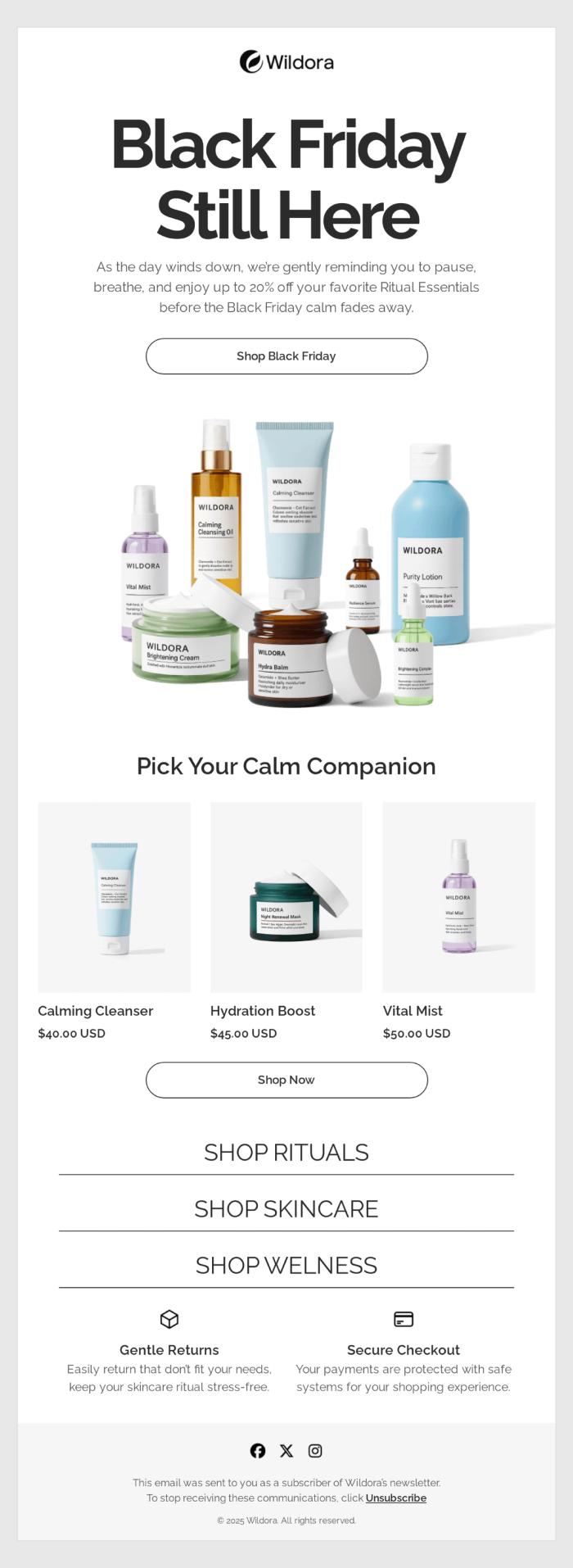
Recover the readers who didn't act the first time. A calm "still here" headline reassures rather than shouts, one hero CTA sits above the fold, and a compact three-product row keeps the choice simple. Drop it in as the second or third email in a Black Friday sequence, when you want to remind without piling on the pressure. Try the template →
Cyber Monday Extended Sale
Type: Promotional · Use case: Extended sale with product recommendations
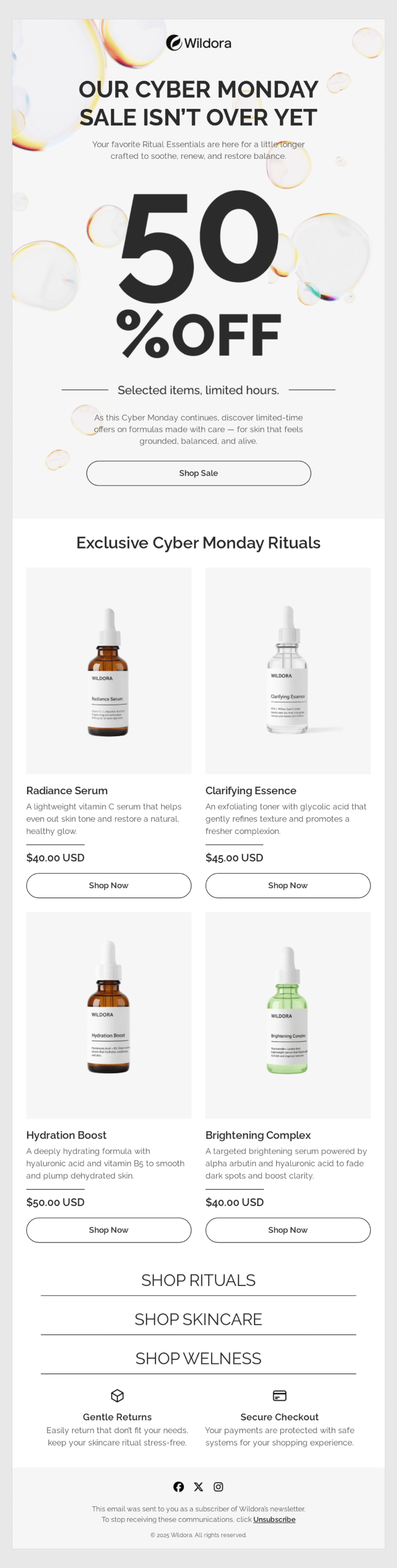
Keep a sale alive past its deadline without losing the energy. An oversized "50% OFF" headline funnels straight to a single "Shop Sale" button — a textbook inverted pyramid — and a four-product recommendation grid below gives undecided readers something concrete to click. Use it to push a sale into a second wave. Try the template →
Cyber Monday Countdown Reminder
Type: Promotional · Use case: Time-sensitive sale with a live countdown
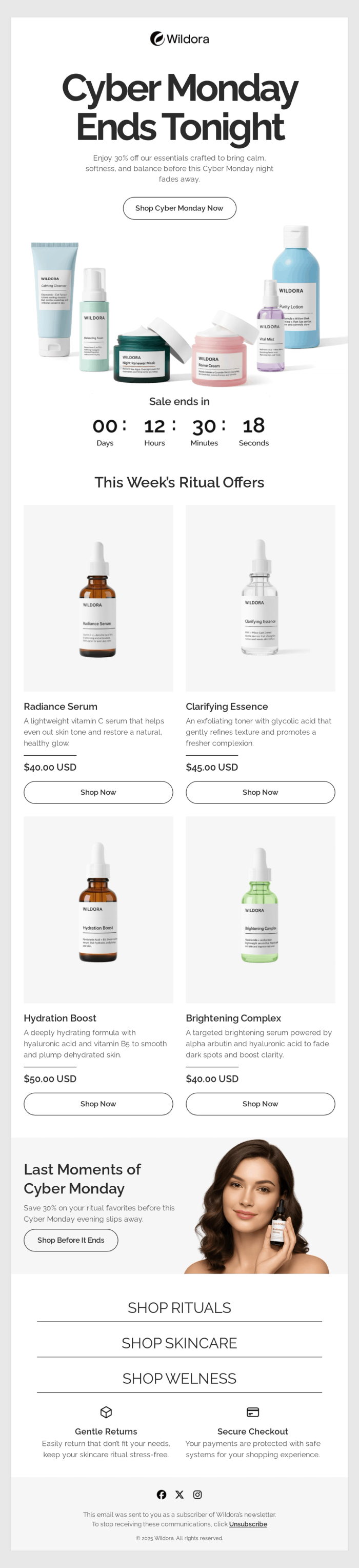
Add a ticking clock and watch urgency do the work. This template runs the inverted pyramid twice — once to earn an immediate click, then again past the timer and product row to move the hesitant. Pair the live countdown with a clear "Ends Tonight" and you've got the strongest closer for a promotional flow. Try the template →
Colorful Black Friday (High-Energy)
Type: Promotional · Use case: Bold, visual-heavy seasonal campaign
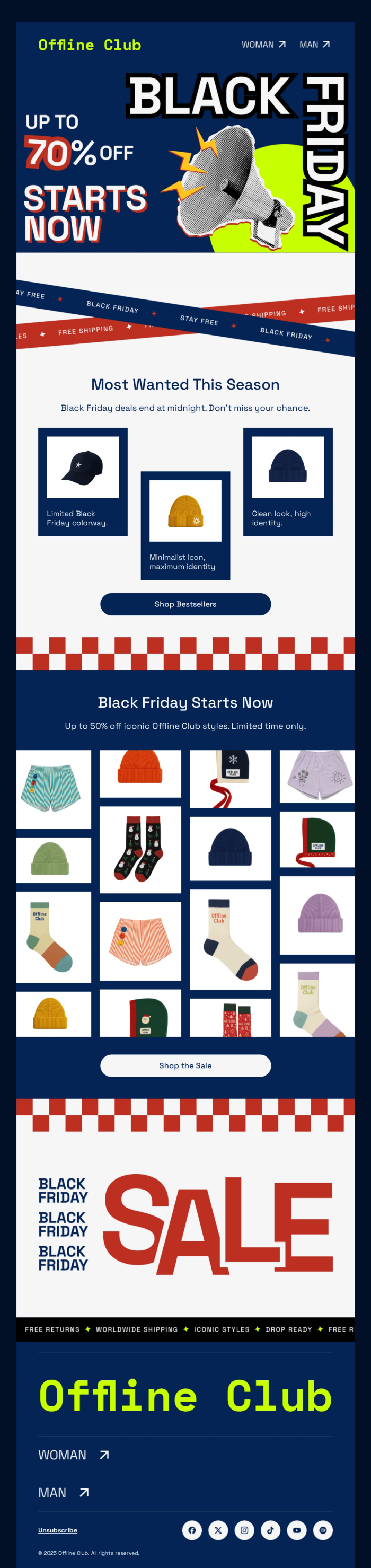
Bring personality instead of minimalism. Diagonal lines, layered textures, and a dense product grid create visual momentum, funneling the energy of a "70% OFF" headline into a "Shop Bestsellers" button — and the staggered placement keeps the reader's eye moving instead of stalling. Best for fashion, streetwear, and any brand with a playful identity. Try the template →
Promotion Code Offer
Type: Promotional · Use case: Single-product discount with a promo code
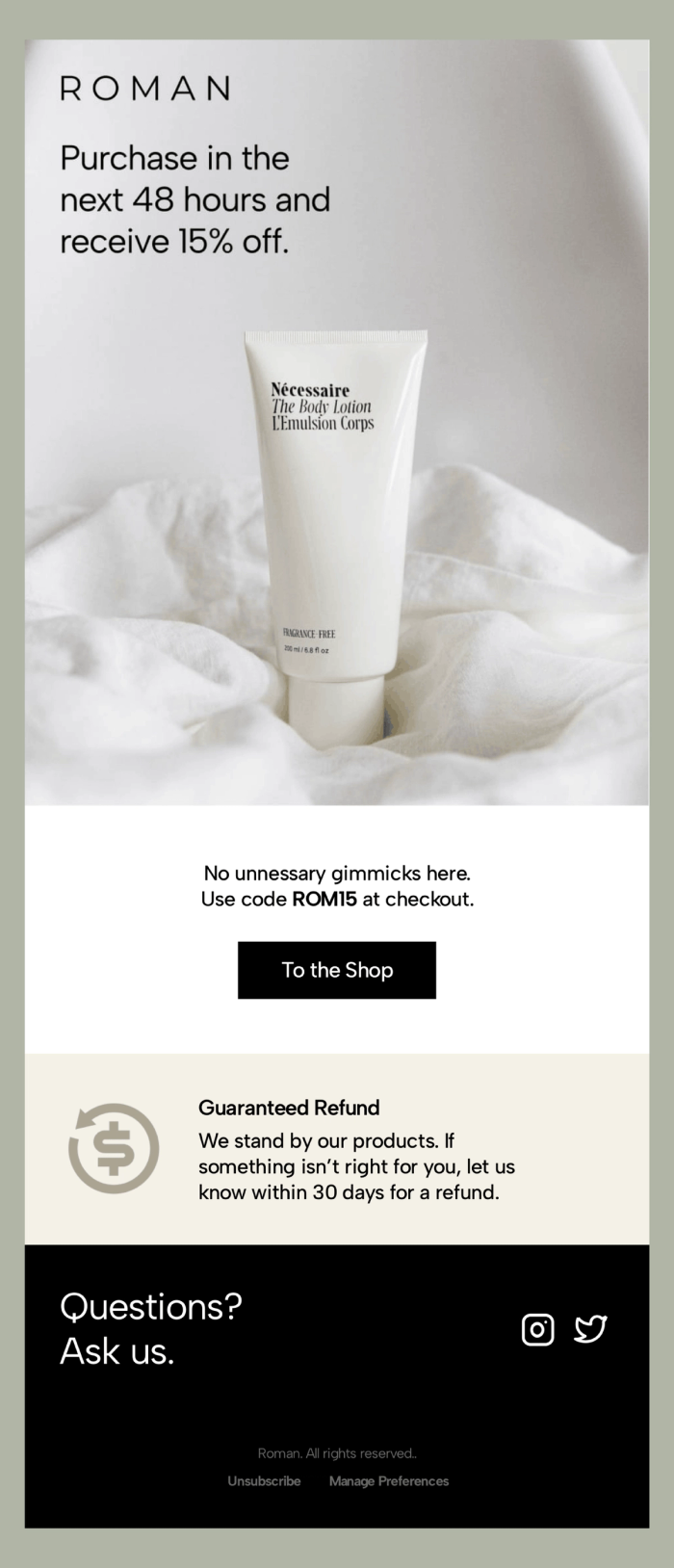
Let one product carry the whole email. A full-bleed photo leads, a single line delivers the offer ("15% off, next 48 hours"), and one dark button closes it. The restraint is the strategy — it reads like a considered brand statement, not a blast. Ideal for premium or single-SKU brands that sell on feel. Browse discount offer templates →
Code Promotion with Countdown
Type: Promotional · Use case: Coupon-driven sale with a deadline
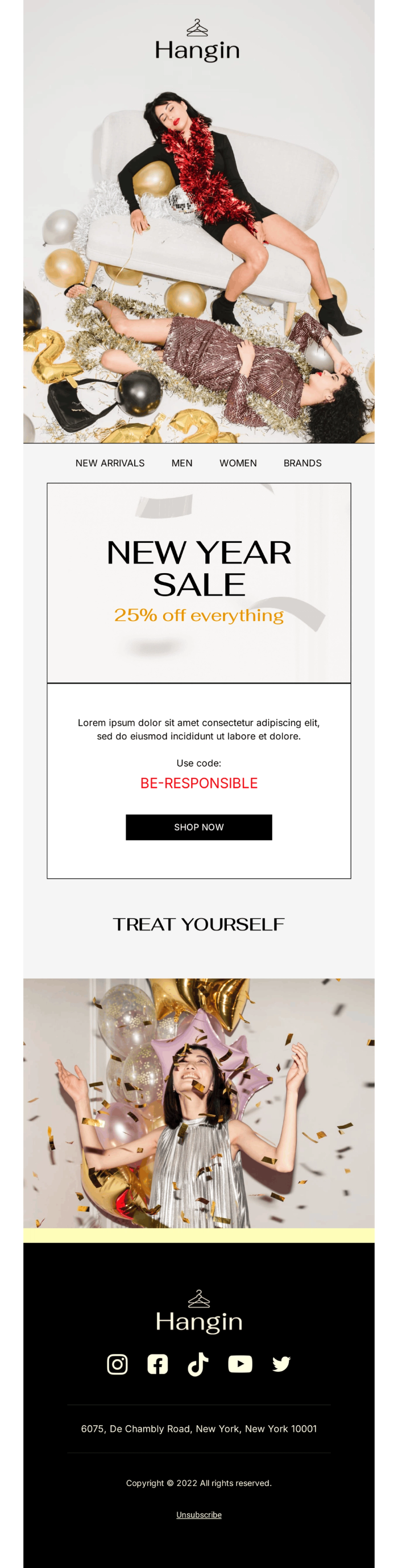
Pair a promo code with a prominent countdown and you give readers both a reason and a reason to hurry. A bold sale headline sits up top, the code and timer anchor the middle, and a single CTA drives the click. Use it for limited-window coupon campaigns where the deadline itself is the motivator. Browse holiday email templates →
Product Catalogue and Showcase Templates
Winter Gift Guide Catalogue
Type: Promotional · Use case: Seasonal gift guide organized by category
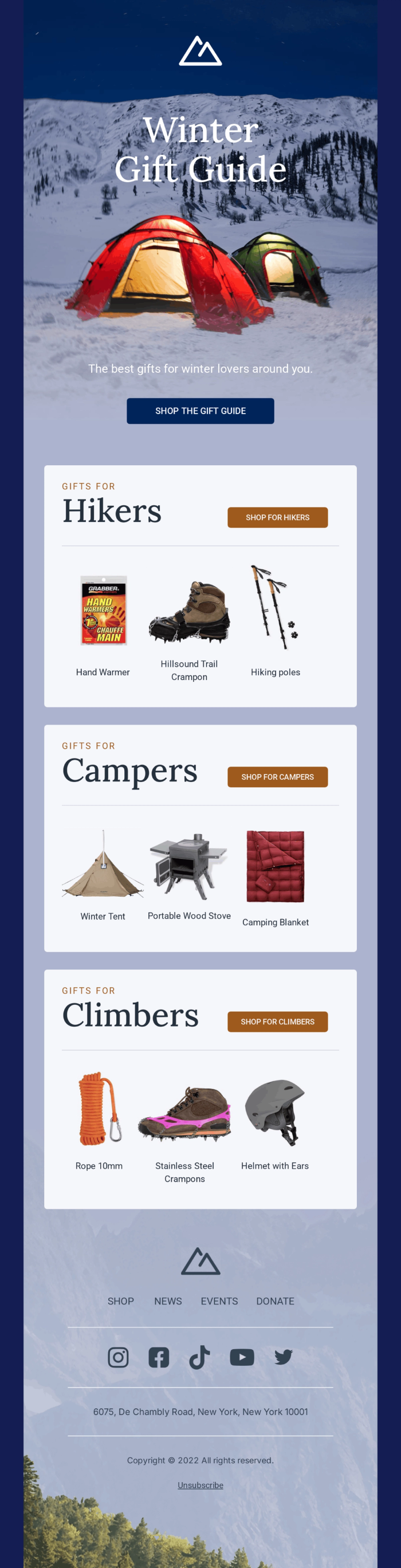
Make a big range feel browsable. This catalogue splits products into clear, shoppable categories — each with its own header, a row of products, and a dedicated button — while an atmospheric hero sets the seasonal mood. The modular blocks turn an overwhelming lineup into something a reader can scan and shop. Perfect for gift guides and seasonal collections. Try the template →
Product Recommendation Grid
Type: Promotional · Use case: Personalized product recommendations
Show each reader products that actually fit them. Built to pair with dynamic content, this clean grid populates itself from browsing or purchase history, so one design serves every segment — each card holding an image, name, price, and CTA. Strong for cross-sell, "you might also like," and post-purchase follow-ups. Browse e-commerce templates →
Electronics and Tech Products Sale
Type: Promotional · Use case: Tech and electronics sale

Let the product visuals sell. Tuned for electronics, this template leads with strong imagery and clear pricing, then steadies the buyer with trust signals — returns, secure checkout — near the footer. Each product stays distinct and scannable, which matters when specs and price decide the click. Use it for gadget launches and electronics catalogues. Try the template →
Abandoned Cart Templates
Abandoned Cart Discount Offer
Type: Promotional (triggered) · Use case: Cart recovery with an incentive
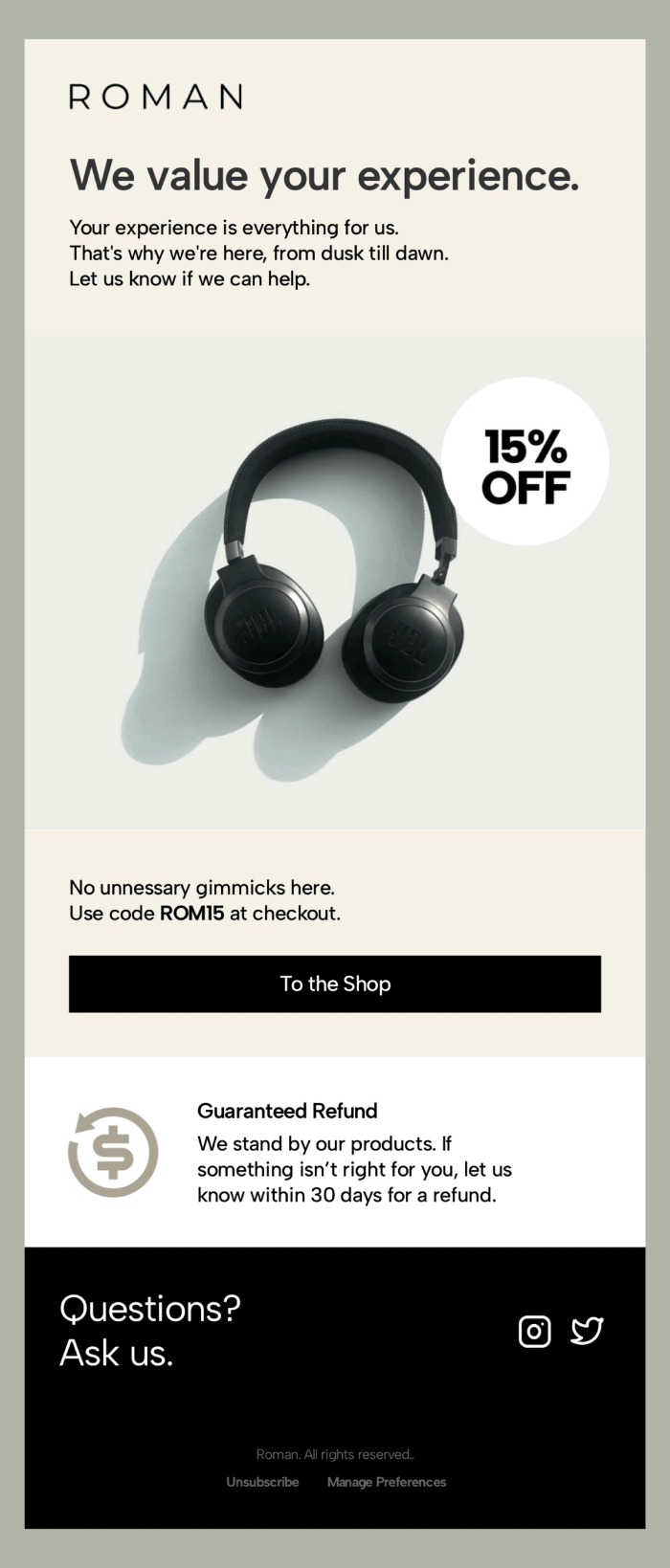
Win back a shopper who almost bought. A large image, a short reminder, and one centered button strip away every distraction, so the only obvious move is to return to the cart — a clean inverted pyramid doing exactly one job. Add a small discount here and you often tip an undecided buyer over the line. Try the template →
Abandoned Cart Reminder
Type: Promotional (triggered) · Use case: Cart recovery without a discount
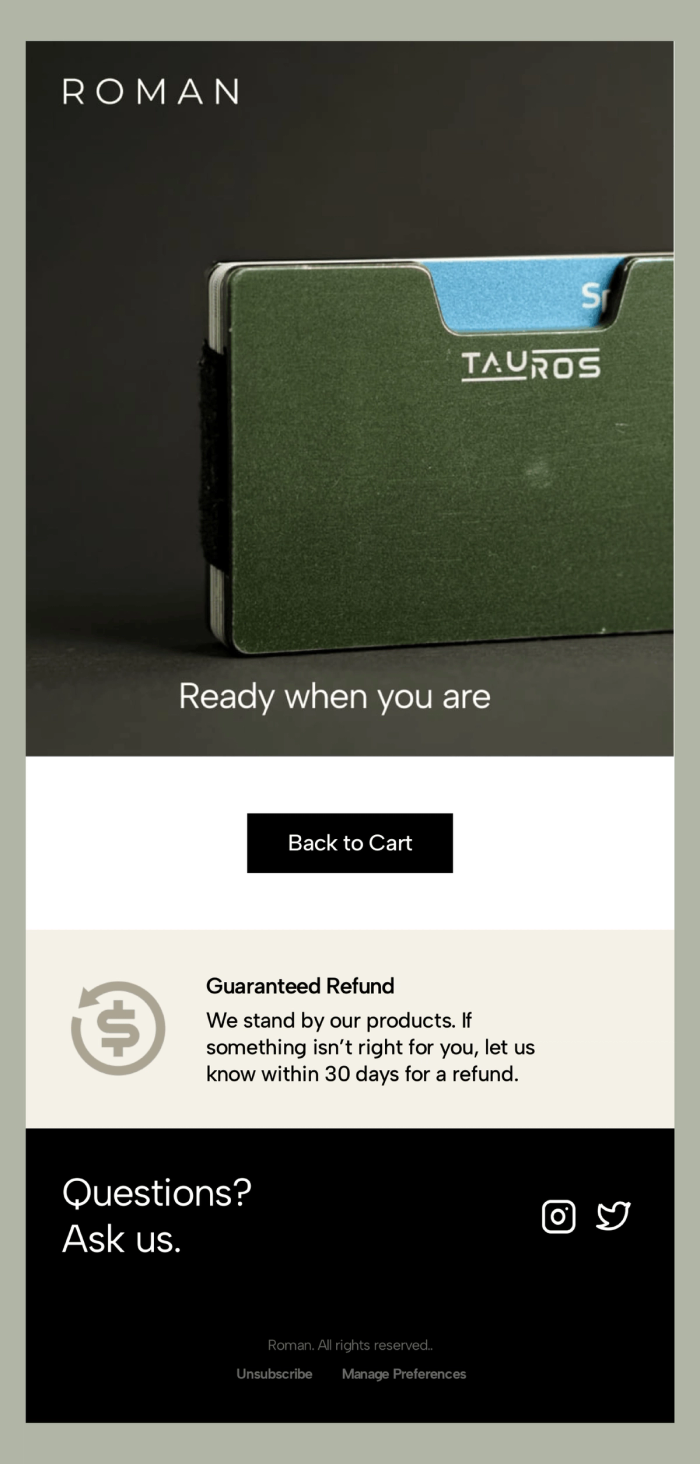
Nudge instead of discount when you'd rather protect your margin. A bold product visual, a "ready when you are" line, and a single "back to cart" button keep this one short and frictionless, with a refund guarantee underneath to ease any hesitation. Send it within hours of abandonment as the first touch in a recovery flow. Try the template →
Newsletter and Relational Templates
Single-Post Newsletter
Type: Relational · Use case: Driving traffic to one article or update
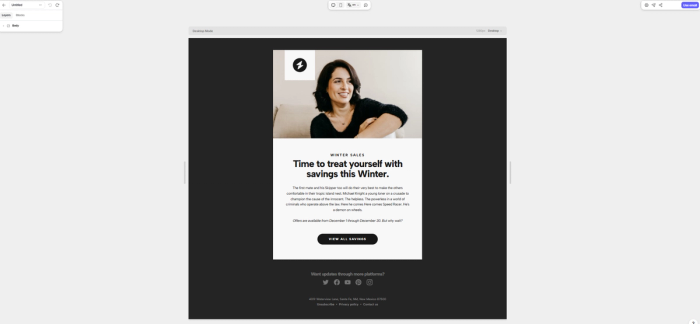
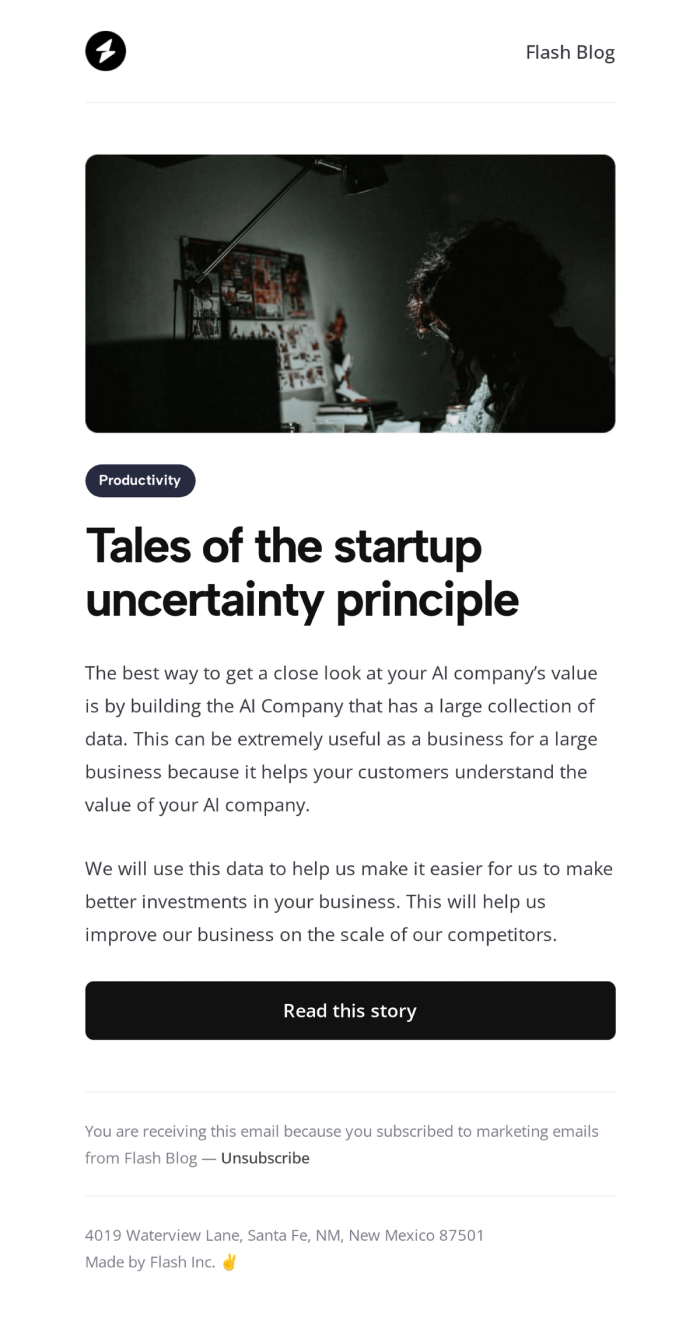
Put every bit of attention on one link. A single image, a category tag, a strong headline, a short teaser, and a "read this story" button — that's the whole email, on purpose. The restraint makes it ideal for blog promotion, announcements, and editorial sends where splitting focus across stories would only cost you clicks. Try the template →
Blog Digest Newsletter
Type: Relational · Use case: Multi-story roundup or content digest
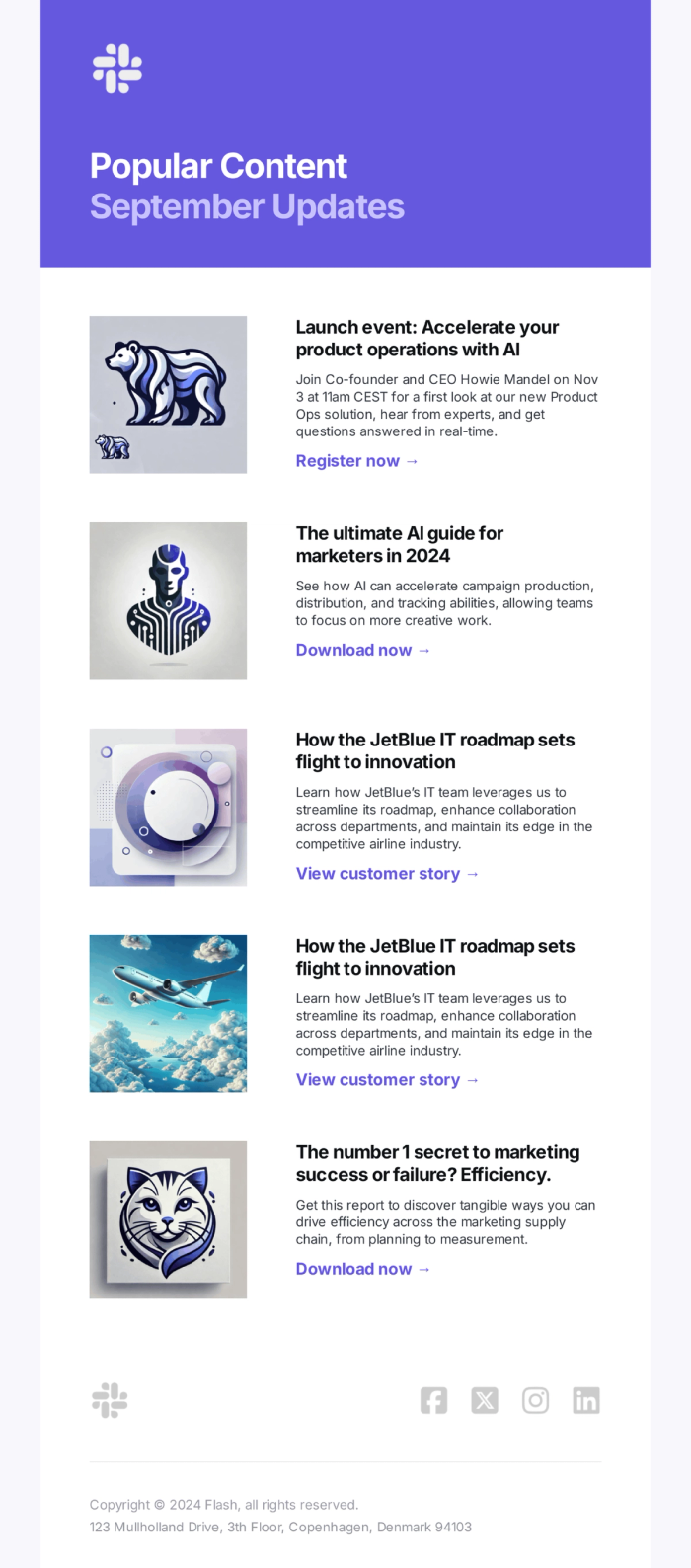
Stack several stories into a feed a reader can skim in seconds. Each content card carries a thumbnail, headline, short summary, and link, and the zig-zag of blocks keeps a long roundup readable. The consistent structure makes it fast to assemble every week or month. Best for content roundups, product updates, and "popular this month" sends. Browse newsletter templates →
Editorial Newsletter
Type: Relational · Use case: Branded newsletter with a feature story
Lead with one story and tell it well. A strong lifestyle hero, a clear headline, and supporting copy funnel down to a single prominent CTA, while generous typography gives the whole thing an editorial feel without losing the single-action focus. Use it for brand storytelling, seasonal editorials, and newsletters built around one feature. Browse newsletter templates →
Company Message or Letter
Type: Relational · Use case: Personal message, announcement, or update
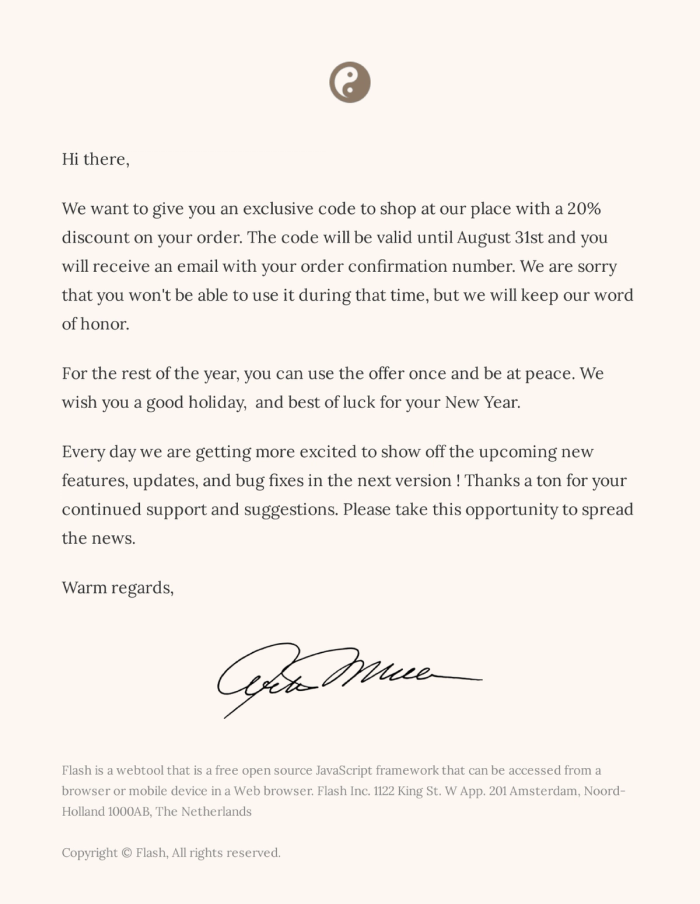
Sometimes warmth beats polish. This deliberately stripped-back, letter-style template reads like a one-to-one note — a personal greeting, body copy, a signature, nothing more. It's the hybrid format in practice: light HTML that feels like plain text. Ideal for founder updates, policy changes, holiday messages, and any moment where sincerity matters most. Browse small business templates →
Get More From Every Template: Best Practices
A good template gets you most of the way. These habits carry it the rest.
Lead with one call to action. Every section should funnel toward a single, obvious next step. Competing buttons split attention and dilute the click — give your CTA contrast, space, and one clear job. The full breakdown is in CTA best practices.
Give the design room to breathe. White space isn't empty — it's what makes your headline, your hero, and your button stand out. A crowded email hides its own message.
Mind your image-to-text ratio. Lean too hard on images and you trip spam filters and break for readers who block images. Keep a healthy balance and your email lands where it should — the image-to-text ratio guide shows you the range to stay in.
Design mobile-first. Half your readers open on a phone, so build for the small screen first. A single-column layout and generous tap targets keep your email intact wherever it opens. The email size guide covers the widths and limits to work within.
Earn the open with the subject line. The best template in the world does nothing unopened. Write a subject line that sounds like a person, not a billboard — start from the best email subject lines for sales.
Make it accessible. Add alt text, keep contrast strong, and structure your content so screen readers can follow it — you reach more readers and you look more professional doing it. The essentials are in accessibility best practices in email design.
Personalize Templates with Dynamic Content
A template gives you a professional starting point — but the same email sent to everyone leaves results on the table. Personalization is what turns a broadcast into something that reads as written-for-me, and in competitive markets like e-commerce, that difference shows up directly in clicks.
Tabular lets you personalize at three levels. Dynamic variables pull recipient data straight from your sending platform — drop {{ first_name }} or a location into the copy, and one template speaks to every segment without losing its personal tone. For-loop product blocks render recommendations on the fly from a reader's browsing or order history, so the Product Recommendation Grid above shows each shopper a different lineup from a single design. Conditional blocks (if-statements) show or hide whole sections per segment, so a loyal subscriber and a first-time visitor can open structurally different versions of the same email.
The payoff is reach without rework: build one template, set the dynamic logic once, and let it adapt to thousands of readers. That's the practical route to the kind of trigger-based, behavior-driven campaigns that re-engage shoppers and recover lost sales — without maintaining a separate email for every audience.
Keep Every Email On-Brand with Team Collaboration
Email design is rarely a solo job. A single campaign usually moves through a copywriter, a designer, and a marketing lead — and the more hands involved, the easier it is for branding to drift and timelines to slip. A template fixes consistency for one person; a shared workspace fixes it for the whole team.
Tabular brings everyone into one place to build email together. Shared teamspace styles act as a single source of truth for headings, buttons, colors, and spacing — change a style once and it syncs across every email in the teamspace, so nothing falls out of brand. Reusable team blocks do the same for components: build a footer once, update it everywhere at once. Commenting lets teammates leave, reply to, and resolve feedback right on the design instead of in a scattered thread, and version history keeps a reliable record of every change. Roles and permissions — plus open, closed, and secret teamspaces — control who can do what, which matters when an agency juggles multiple client brands, including the confidential ones.
The result is speed without losing control: a small team ships more campaigns, and a large one stays consistent as it grows, because the workspace enforces the brand rules instead of trusting everyone to remember them. For more on the building-block approach behind this, see modular email templates.
Build and Customize Any Template in Tabular
Every template above is a starting point, not a cage. In Tabular's drag-and-drop email builder, you restyle any block, swap the layout, set a deliberately different mobile design, and pull in dynamic content like names and product recommendations — all visually, without writing a line of HTML. The smart HTML engine handles cross-client compatibility behind the scenes, so your design renders correctly across 50+ email clients, including older versions of Outlook.
When you're ready to send, export the finished email as HTML or PDF, copy the code, or push it directly to one of 20+ email sending platforms — including HubSpot, Mailchimp, Klaviyo, and Brevo. You own the output, every time.
The templates are free, professionally designed, and built to be customized. Browse the full template gallery to find your starting point, or start building for free and make one your own.
Frequently Asked Questions
Are these email marketing templates really free?
Yes. Every template in Tabular's gallery is free to use and fully editable. Customize any of them and export the result as HTML or PDF, or send it through your own platform. Tabular's free-forever tier comes with unlimited guests and teamspaces, so you can start building without a trial clock running.
Can I use these templates with my existing email service?
Yes. Tabular is an email builder, not a sender — you design here and send wherever you already do. Finished templates export as clean HTML or PDF, or push directly into 20+ email sending platforms including HubSpot, Mailchimp, Klaviyo, and SendGrid. The connection creates and updates the matching template in your destination tool, so an edit in Tabular carries downstream in a click.
Will these templates render correctly in Outlook?
Yes. The usual culprit behind a broken email is older desktop Outlook, which forces table-based layouts and strips modern CSS. Tabular's smart HTML engine generates code that renders correctly across 50+ email clients, including older Outlook versions — so you don't have to debug rendering by hand.
How do I choose the right template for my campaign?
Start with the job the email needs to do. For a single sale or launch, use a promotional template with an inverted-pyramid layout and one clear CTA. For cart recovery, use a focused, low-distraction abandoned-cart template. For ongoing engagement, use a newsletter. Match the type — promotional, transactional, or relational — to where your reader sits in their journey.
Can my whole team work on the same template?
Yes. Teammates can build in shared teamspaces, comment and resolve feedback directly on the design, and rely on shared styles and reusable blocks to stay on-brand. Version history keeps a record of every change, and roles and permissions control who can edit, view, or guest.